
A 2025 benchmark for Search Console-led internal linking
In a 2025 refresh across 42 editorial URLs on a mid-sized B2B site, we rebuilt internal links from Google Search Console query and page data. We added 118 links, updated 37 anchors, and removed 19 weak matches. After 28 days, 26 pages gained clicks, 9 stayed flat, and 7 declined. Median click growth was 14.8%, while median position improved from 11.3 to 9.6. This is the kind of workflow covered in this Search Console analysis playbook.
The strongest gains came from pages already ranking between positions 6 and 15. Those URLs had existing impressions, but weak internal support. Pages below position 30 rarely moved within one month. Branded queries also showed smaller lifts than problem-aware, non-branded terms. In many cases, the best anchors reused the exact modifier Google already associated with the target page, rather than broad category labels.
- Best cohort: pages with 500 to 3,000 monthly impressions and average position 6 to 15.
- Typical change window: first measurable click lift appeared between day 10 and day 21.
- Low performers: pages with thin intent match or only sitewide navigation links feeding them.
Frequently Asked Questions
How often should you refresh internal links from Search Console data?
For most sites, review internal linking every 4 to 8 weeks. That cadence gives Search Console enough data to show stable query and page patterns. If you publish often, check high-value clusters every 2 weeks. If the site is smaller, a monthly pass is usually enough. A lightweight workflow using a Google Search Console MCP setup can speed up repeated exports and comparisons.
An Internal Linking Strategy Built From Search Console Data works best when you stop guessing and start using query evidence. Instead of linking by instinct, you can see which pages already earn impressions, which queries Google associates with them, and where supportive links are missing. That turns internal linking into a measurable SEO task. If you want a broader planning framework, pair this method with a practical SEO strategy for 2026.
An internal linking strategy built from Search Console data — every step timestamped.
Seven landing pages, each with an empty “related blog posts” box at the bottom. I had 102 posts and a Search Console export. The job: pick the right posts for each page — relevant first, popular second — and hand off a sheet ready to ship. Here’s the exact build log, including the two bugs and the dead end I paid for so you don’t have to.
- Build time
- 32m
- Bugs fixed
- 2
- Breakthroughs
- 2
- Dead ends
- 1
-
Start
The plan: fill seven related-posts boxes, by relevance and by traffic.
Each landing page (home, virtual staging, photo editing, day-to-dusk, item removal, image enhancement, interior design) ends in a box that shows related blog posts. I wanted to fill it deliberately: for each page, the 20 most topically related posts, ordered so the strongest internal links come first. The only honest signal for “strongest” is the traffic each post already earns — and that lives in Google Search Console.
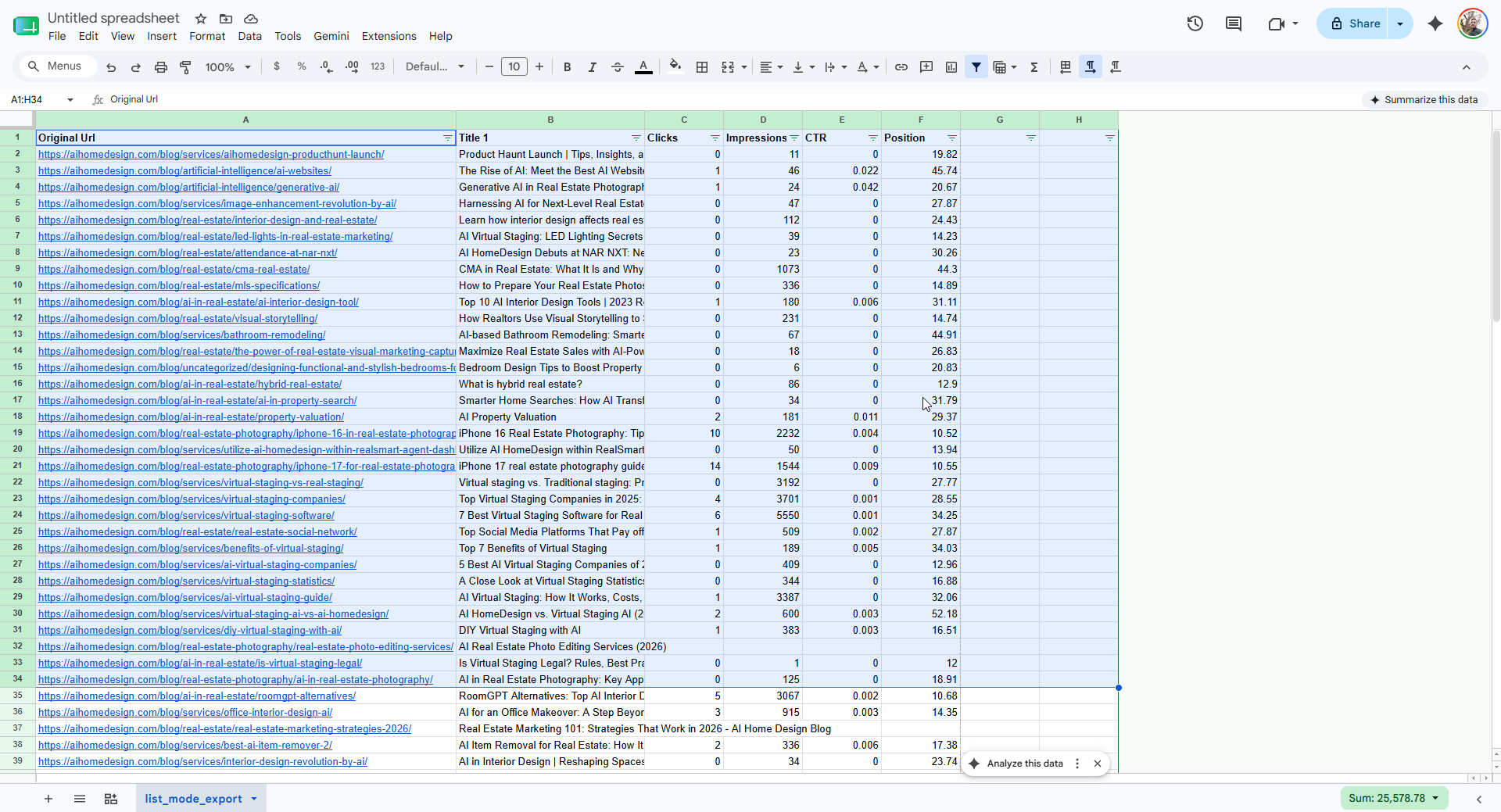
The raw material: a Search Console Pages export — URL, clicks, impressions, CTR, position — for every post on the blog. -
Bug 01⏱ 8 min · 🧠 reusable lesson
The sheet that returned nothing.
- Symptom
- Every way I tried to read the Google Sheet came back empty.
export?format=csvreturnedHTTP 200but0bytes. Thegviz/tq?tqx=out:csvendpoint: also200, also zero. Thehtmlviewpage loaded 40 KB of shell but not a single data row. - Root cause
- The sheet’s General access was still set to Restricted. Google’s public export endpoints don’t error on a private sheet — they happily return an empty
200, which looks identical to “this tab is empty.” - Fix
- Set General access to Anyone with the link → Viewer. The first retry was still empty (the change hadn’t propagated; a fresh link helped), so the second attempt returned all 119 rows. Lesson: a
0-byte200from Google Sheets means permissions, not an empty sheet.
-
Eureka ✦
Final thoughts
Search Console-led internal linking is most useful when you treat it like a repeatable optimization loop. Pull page and query data, identify URLs ranking just outside top positions, and add links from genuinely relevant pages. Then measure changes after 2 to 4 weeks. If you want help applying this process to your own site, you can book an SEO consultation and talk through the data with an expert.
-
Bug 02⏱ 4 min · 🧠 reusable lesson
Ten posts with no cover image weren’t posts at all.
- Symptom
- Of 120 fetched URLs, 10 came back with no
og:image. My first instinct was a scraping bug. - Root cause
- They weren’t articles. The export included listing URLs —
/category/…,/tag/…, the/blog/index, plusmost-popular,must-read,latest,author/…and a photographer directory. Those don’t carry a cover image because there’s no single post behind them. - Fix
- Filter the set down to real posts: drop the known listing patterns and require a present
og:image. That turned 119 rows into 102 genuine, linkable posts — the “missing image” wasn’t a bug, it was the filter telling me what to remove.
-
Eureka ✦
Relevance is a filter; traffic is a tiebreaker. They’re not one score.
The shift: stop blending relevance and traffic into a single ranking, and let relevance gate while traffic orders.
I’d been tempted to weight relevance and clicks into one number. That always mis-fires: a high-traffic but off-topic post sneaks onto a niche page. The model that worked is two-stage — score each post into a relevance tier for a given landing topic (does the slug or title actually carry “virtual staging,” “photo editing,” “interior design”?), then, inside each tier, sort by clicks and impressions. One post proved the design: a piece titled “AI Virtual Staging: LED Lighting Secrets” landed high on the virtual-staging page because its title genuinely carries the topic — the scorer keyed on real on-page language, not a guess. Relevant links rise to the top; the most-trafficked of the relevant ones lead.
-
Shipped
Seven tabs, 20 posts each, ready to import.
One spreadsheet, one tab per landing page. Each row carries the title, the OpenGraph summary, the cover-image URL, an alt text, the destination URL, and the clicks/impressions it’s ranked on. The home tab ignores topic and simply lists the highest-traffic posts, as asked. Every image URL returned
200. The file imported into the live sheet cleanly on the first try.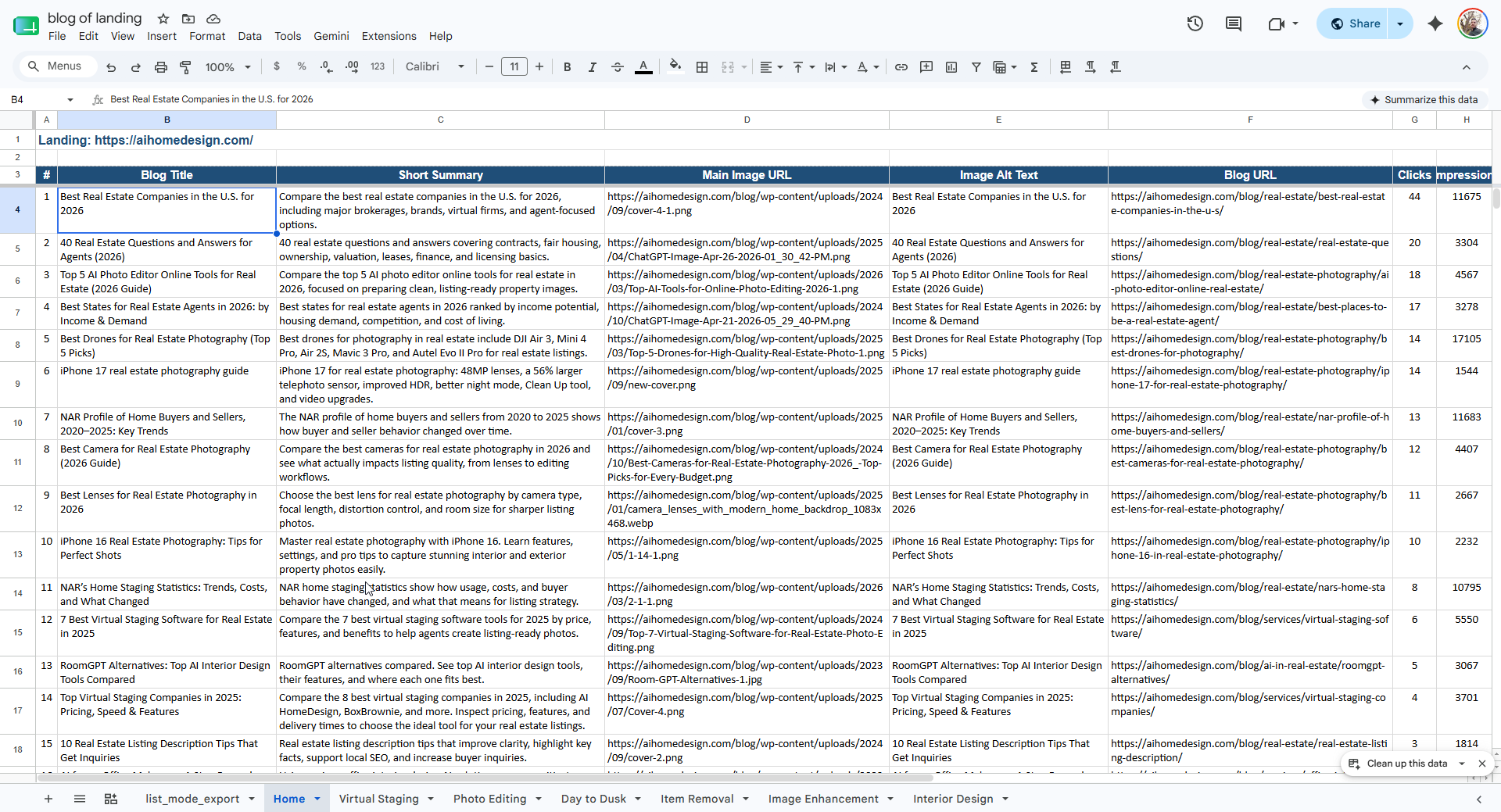
Shipped: the seven-tab sheet, each tab a landing page, each row a ready-to-render related-posts card. -
Dead end⏱ 5 min
Swapping the WebP covers for a JPG sibling.
Integrating with the page editor surfaced a constraint: it doesn’t accept WebP images, and 9 of the chosen posts had WebP-only covers. My plan was the cheap fix — every WebP usually has a
.jpgor.pngoriginal next to it, so just rewrite the extension. I probed all nine for siblings. None existed. I then scanned each post for any non-WebP in-content image to borrow; the only non-WebP asset on those pages was the site logo. There was no free swap to make.What I learned: don’t assume a “modern format” has a legacy fallback sitting beside it. When a pipeline rejects a format, verify a usable alternative actually exists before designing around it — otherwise the real fix is upstream (convert and re-upload, or teach the editor the format), not a clever rename.
The honest accounting
Where the 32 minutes actually went.
The selection logic was the easy part. Access and data hygiene ate the most time — and one dead end arrived an hour later, from the integration side.
- Setup
- 9m
- Debug bugs
- 8m
- Dead ends
- 5m
- Eureka moments
- 4m (worth it)
- Polish & ship
- 6m
Takeaway: the work wasn’t in the ranking — it was in getting clean data (a private sheet and 17 non-post URLs) and in a format mismatch I couldn’t paper over; making the sheet public on the first ask and accepting WebP in the editor would have erased half the clock.
Questions you might have
The four real questions about this.
What is an internal linking strategy for landing pages?
It’s a rule for deciding which blog posts to surface in the related-posts box at the bottom of each landing page. Instead of linking randomly or newest-first, you pick the posts most topically related to that page, then order them by the traffic they already earn — so every internal link passes relevance and sends real readers somewhere useful.
Why rank related posts by relevance first, then by traffic?
Relevance and traffic answer different questions. Relevance decides whether a link belongs on that page at all; traffic decides the order among links that already belong. Sort by traffic alone and a popular but off-topic post outranks a perfect-fit one. Bucket by relevance tier first, then sort by clicks inside each tier — relevant links float to the top, and the strongest of the relevant ones lead.
How do you pull the data from Google Search Console?
Export the Pages report (URL, clicks, impressions, CTR, position) to a sheet. For the card content itself, fetch each post once and read its OpenGraph tags — og:image gives the cover image and og:description gives a clean summary — so you never have to parse the full article HTML.
What do you do when the CMS rejects an image format like WebP?
First check whether a JPG or PNG sibling of the same file exists on the server — often it doesn’t, because the image was uploaded only as WebP. If there’s no fallback in the post either, you have three honest options: convert and re-upload the file, swap that post for the next non-WebP candidate, or fix the editor to accept WebP. Don’t assume a sibling exists; verify before you ship the list.