
Set SEO benchmarks before the redesign goes live
Before any landing page redesign launches, freeze a benchmark set for rankings, clicks, impressions, conversions, and engagement. Use at least 90 days of data from Google Search Console and GA4. For seasonal pages, use 12 months. Record the top 20 queries, branded versus non-branded traffic, click-through rate, average position, assisted conversions, and scroll depth. If you skip this step, every post-launch debate becomes opinion instead of diagnosis.
Also archive the current page HTML, title tag, H1, canonicals, schema, internal links, and above-the-fold copy. Take screenshots on desktop and mobile. Export backlink data for the exact URL from Ahrefs or Semrush, because some redesigns silently change paths and lose earned equity. Keep a redirect map draft beside the benchmark file so content, dev, and paid teams review the same source of truth.
A useful benchmark is a query-to-section map. Match each high-value query to the page block that serves it, such as pricing, proof, integrations, or FAQ. That makes content loss obvious during design review. If your team wants a broader measurement framework, the SEO strategy playbook helps connect page metrics to business outcomes rather than vanity rankings alone.
Fix redirects, sitemaps, and broken links before launch
Redirect errors are still one of the fastest ways to turn a redesign into an SEO loss. Every retired landing page URL needs a one-to-one 301 redirect to the closest live equivalent. Avoid redirect chains and homepage redirects. Screaming Frog, Sitebulb, and Chrome DevTools can catch 3xx loops, 404s, mixed canonicals, and blocked assets before launch. Test both desktop and mobile variants, especially on JavaScript-heavy builders.
Update the XML sitemap the same day the redesign goes live. Remove old URLs, add the final destination pages, and resubmit the sitemap in Search Console. Then crawl the staging export and the production site to find broken internal links, image references, and CTA paths. A single broken thank-you page can hide conversion issues for weeks. Also check robots.txt and meta robots rules, because staging directives sometimes leak into production.
Internal links deserve extra attention after core updates. When supporting pages still point to retired URLs or old anchor text, you weaken topical reinforcement across the site. Review nav links, footer links, breadcrumbs, and contextual links inside related guides. If your process involves automated QA, Google Search Console MCP tools can speed up validation across indexed pages once the new version is live.
Why landing page redesign audits matter after core updates
A landing page redesign can fail even when the new version looks cleaner, loads faster, and converts better in user tests. Core updates often reweight quality signals that were already fragile. If the redesign also changes copy depth, internal links, layout hierarchy, or trust elements, rankings can drop fast. That is why Auditing a Landing Page Redesign: 13 SEO Bugs You’ll Hit needs an update lens, not just a launch checklist.
Google says broad core updates focus on surfacing helpful, reliable content rather than fixing a single technical issue (per Google Search Central guidance). In practice, that means redesign audits should check whether the page still matches search intent, preserves proof points, and keeps strong entity signals. Teams using Google Search Console analysis workflows can compare query loss, click shifts, and page-level changes before launch instead of guessing after a traffic dip.
- Track whether key sections, FAQs, reviews, and comparison content were removed during the redesign.
- Check that headings, schema, and internal links still reinforce the same topic and conversion path.
- Validate that UX improvements did not weaken relevance, trust, or crawlable content.
Frequently Asked Questions
How do core updates change what to check in a landing page redesign?
Core updates raise the importance of quality checks that go beyond technical SEO. During a redesign, review whether the page lost helpful detail, trust signals, author or brand context, comparison content, and internal links that supported the main topic. Also compare pre-launch and post-launch query coverage. If rankings shift after release, an SEO consultation can help separate redesign damage from broader update volatility.
wrap up
A strong redesign audit protects more than rankings. It preserves relevance, trust, and conversion paths while Google keeps refining how it evaluates page quality. Benchmark first, map every redirect, and verify that new layouts still serve the same intent. When redesign decisions are tied to real search data, recovery work gets smaller and launch confidence gets higher.
Auditing a Landing Page Redesign: 13 SEO Bugs You’ll Hit is not just a pre-launch exercise anymore. A modern redesign can remove the exact signals that kept the page visible before Google reevaluates quality sitewide. Teams often focus on page speed and visuals, then miss query coverage, trust elements, or redirect accuracy. This refresh shows where core updates raise the stakes and what to measure before launch so ranking losses are easier to prevent.
Auditing a landing page redesign before launch — 13 SEO bugs, every minute timestamped.
A 2-hour chat-driven SEO audit on a pre-launch SaaS landing page. Three bugs, three breakthroughs, one dead end. Including the moment we found an entire body-text block written about a different product — and the moment a single-tool keyword constraint surfaced a zero-competition keyword the big tools missed.
- Build time
- 2h 06m
- Bugs fixed
- 3
- Breakthroughs
- 3
- Dead ends
- 1
-
Start
The plan: audit a redesigned landing page before it goes live.
A real-estate SaaS had redesigned the landing page for their main product and asked for an SEO review before pushing it to production. The page was beautiful — better hero, cleaner stats, animated step-by-step “how it works” cards. The brief was short: extract the heading structure, do keyword research, and tell me what to change. Three data sources lined up: Google Keyword Planner for volumes, Google Search Console for the current page’s organic traction, and competitor SERP data to see what was beating it. Two hours later we had a different page.
-
Eureka ✦
Two whole sections were about a different product.
The shift: this isn’t a copy-tweak job — the CMS imported text from a sibling page and Google’s strongest body-text signal points at the wrong keyword.
Extracted the headings into a flat list. The stats H2 said “What You Get with AI Image Enhancement” — on a page about a different feature entirely. Scrolled to the bottom. The whole SEO content block — one H2, five H3s, ~200 words of body copy — was written about item removal. None of it was about the actual product the page was selling. This is what topic drift looks like in a CMS redesign: when the template is reused across sibling pages, body copy travels with it. The largest text block on the page was teaching Google about a keyword the page doesn’t sell.
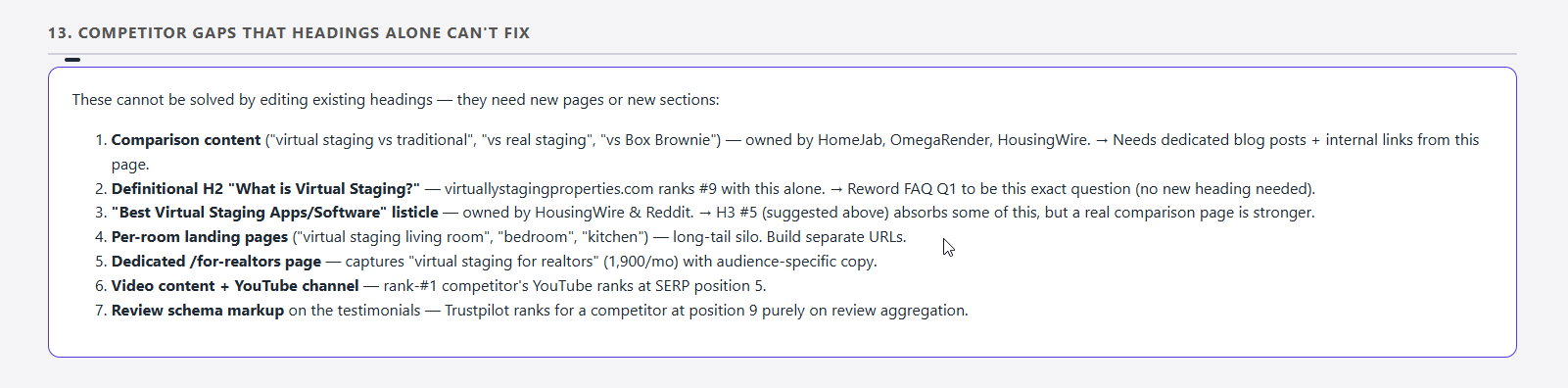
Section 11 of the review document. The entire SEO content block — H2 plus five H3s — was written about a sibling product. Every paragraph beneath these headings reinforced the wrong topical signal. -
Bug 01⏱ 5 min · 🧠 reusable lesson
The visually-dominant H1 carried no keyword.
- Symptom
- The H1 was split into two
<span>elements — a small eyebrow with the brand keyword, and a large main line that said “Stage the Space. Sell the Vision.” Beautiful. Search-irrelevant. - Root cause
- The copywriter optimized the visually-dominant line for emotion. The eyebrow absorbed the keyword by accident, but eyebrow text is the secondary signal — Google reads the larger H1 first.
- Fix
- Replace the main span with “Virtual Staging Software — Stage Any Room in Seconds”. Captures the head term (5,400/mo) and the LOW-competition “software” qualifier (880/mo, competition index 33). The poetic eyebrow stays; we just stopped wasting the dominant line.
-
Bug 02⏱ 18 min · 🧠 reusable lesson
The audit was content-only — it missed everything else.
- Symptom
- First draft of the review only critiqued heading text. The client asked: “what about semantic tags, images, performance?” The page had a section subtitle marked up as
<h2>, the mobile view duplicated every H2, and four testimonials all reused the same two before/after image URLs. None of that came up. - Root cause
- Anchored on the literal request (“heading structure”) and skipped the scaffolding. A real audit covers content and markup and media and performance — they’re all SEO signals.
- Fix
- Rebuilt the document as 13 sections covering: head meta, hero, marquee, how-it-works, stats, features, testimonials, audiences, FAQ, CTA, SEO content block, sitewide observations, and competitor gaps. Inside each: content + semantic + media + performance notes. Hero video using
preload="metadata"with autoplay (LCP risk). Testimonial avatars rendered from transparent 1×1 GIFs. Editor wrapper attributes (data-editable-*,data-astro-cid-*) inflating the DOM. None of these would have surfaced from a heading-only audit.
-
Eureka ✦
The CMS panel was set up but never populated.
The shift: the redesign team built the plumbing for Open Graph and JSON-LD but never filled the values — two distinct failure modes hiding on the same page.
Mid-audit, the client pasted a screenshot of the CMS Page SEO panel. Empty meta tags. Empty schemas.
curlon the production HTML confirmed it:<title>was literally the slug (virtual-staging-service),meta descriptionwas an empty string, noog:title, noog:description, noog:image, no schemas. The redesign team had built the editor controls but never used them. This is its own bug — separate from the topic drift — and on the same page.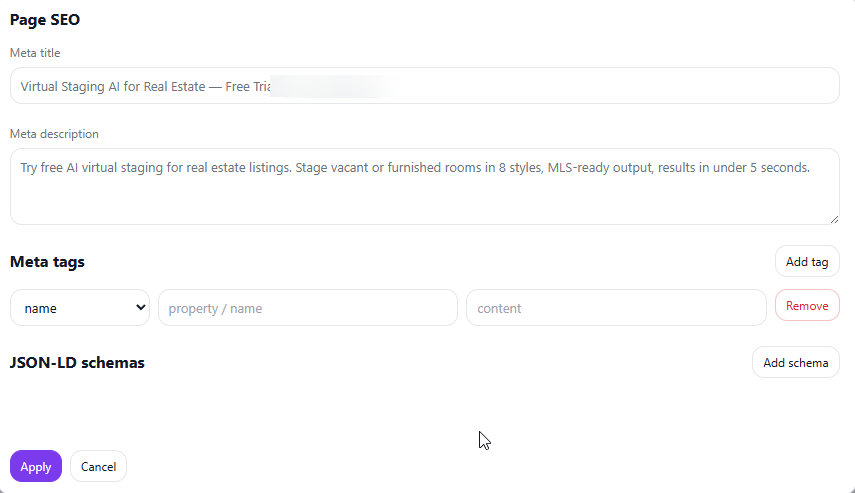
The CMS exposed structured fields for OG tags and JSON-LD schemas. All empty. The plumbing was ready; the audit’s job was to fill it. -
Dead end⏱ 10 min
Trying to explain why
/og/virtual-stagingis not a URL.The client asked: “is
/og/virtual-stagingthe right URL for the page?” The slug looked like an Open Graph artifact, and OG was the topic of the conversation, so the assumption was logical. The instinct was to dive into the protocol spec — whatproperty="og:url"means, why path namespaces are unrelated, how scrapers resolve the canonical URL. Ten minutes of explanation later the client was more confused, not less.What I learned: when explaining technical concepts to non-specialists, lead with where the thing lives, not what it does. “Open Graph tags live in
<head>, never in the URL” is one sentence that answers the question before they ask it. The protocol spec only matters once they trust the placement. -
Bug 03⏱ 7 min · 🧠 reusable lesson
Social URLs drifted to 404s during the redesign.
- Symptom
- Building Organization schema required
sameAssocial URLs. The redesigned footer pointed atlinkedin.com/{brand}/,youtube.com/{brand}/,tiktok.com/{brand}/— all of which return 404. Real platform URLs need specific path structures (/showcase/...,/channel/UC-...,/@username). - Root cause
- Copy/paste between branches during the redesign collapsed every social link into the same flat
platform.com/brand/shape. The CSS was perfect; the URLs themselves had been silently broken. - Fix
- Curl’d the live production page (still the old design) and extracted the verified URLs from its footer. Used those in the schema. Flagged the broken redesign footer URLs separately — they need to be replaced in the redesign before launch, not just in schema.
-
Eureka ✦
The single-tool keyword constraint paid off.
The shift: a constraint that felt limiting at the start of the audit produced the highest-ROI keyword find of the day.
For the SEO content rewrite, the brief was strict: use only Google Keyword Planner. No Ahrefs, no SEMrush. The first instinct was to argue — competitor data adds context. The constraint stuck. Pulled GKP for per-room virtual-staging queries and the table came back with
virtual staging bedroomat 140 searches/month, competition index 0. Thenwhat is staging in real estateat 90/mo, competition index 4. Both terms were absent from the Ahrefs SERP overview run earlier — buried under noisier head-term competitors. The GKP-only constraint surfaced the lowest-competition long-tail terms in the entire audit. The constraint was the win. -
Shipped
Audit handed off. Every recommendation grounded in real data.
Final deliverables: a 13-section heading-by-heading review document, a rewritten SEO content block (H2 + five H3s + closing paragraph) targeting GKP-verified keywords, 14 OG and Twitter meta tag entries, three JSON-LD schemas (
SoftwareApplication,BreadcrumbList,Organization), and a new FAQ entry for the comparison-intent query. Every schema value was either pulled from the page itself or from production HTML viacurl— nothing fabricated. The client implemented the OG tags before the call ended.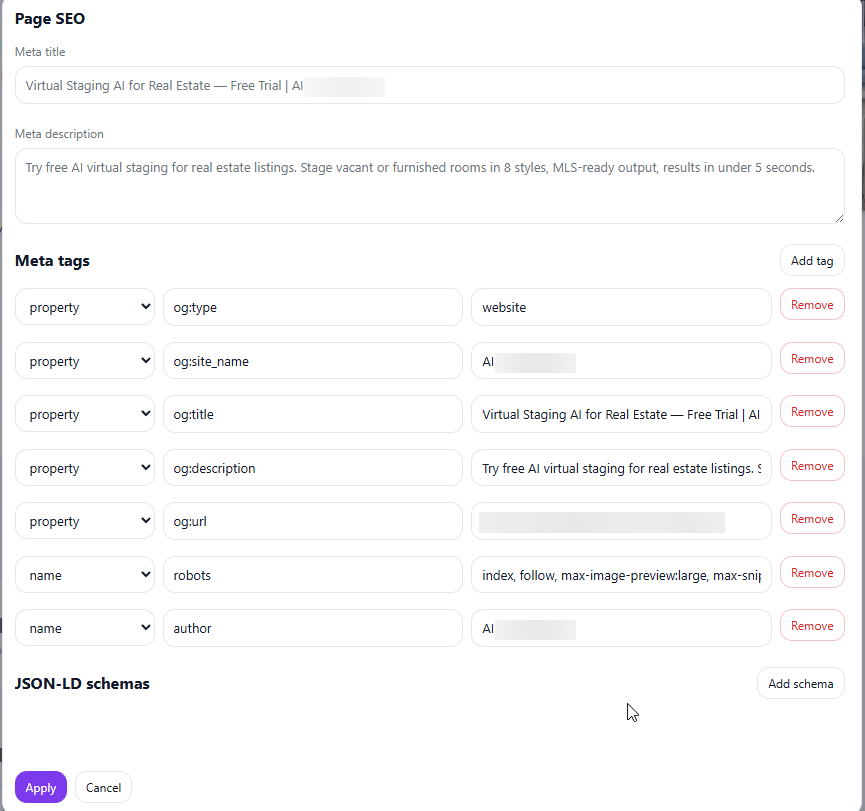
The same CMS panel after applying the audit’s recommendations. Open Graph tags populated, robots directive set, author field filled. The brand name and URL in the screenshot are blurred — this diary is anonymized at the client’s request.
The honest accounting
Where the 2 hours actually went.
Most SEO audit estimates lie because they assume the page is roughly correct and only needs tweaks. This one wasn’t — and the rewrite work after finding topic drift was the biggest single category.
- Setup
- 25m
- Debug bugs
- 35m
- Dead ends
- 10m
- Eureka moments
- 20m (worth it)
- Polish & ship
- 36m
Takeaway: most time went into rewriting copy after discovering topic drift in the CMS-imported content — a heading-only audit would have missed this entirely. The fastest win was the single-tool keyword constraint at minute 122; the deepest cost was Bug 02, accepting the brief literally instead of expanding scope at minute 22.
Questions you might have
The five real questions about this.
What is topic drift in a CMS redesign?
When a CMS template is reused across sibling pages, the body copy of one page can end up on a page about a different product. Google reads the largest body-text block as the strongest topical signal — so a page whose biggest text block is about the wrong product ranks for neither well. The fix is to audit every text block against the page’s actual H1 intent.
How do you find broken topical signals on a landing page?
Extract every heading and large body block into a flat list, then check each one against the H1’s primary keyword. If a block doesn’t share at least one keyword from the H1 cluster, flag it. We caught two entire sections that way — a stats H2 about a different product, and a 200-word SEO block written for a sibling page.
Should Open Graph tags use property or name attributes?
Open Graph tags use property: og:title, og:description, og:image, og:url. Twitter Card tags use name: twitter:card, twitter:title, twitter:image. Standard meta tags (description, robots, author) also use name. Most CMS Page SEO panels have a dropdown to pick between the two — picking the wrong one causes Facebook and LinkedIn to silently ignore the tag.
Why use only Google Keyword Planner for a landing page audit?
Google Keyword Planner reports the same volumes Google’s own ranking system sees, with no third-party model layered on top. Ahrefs and SEMrush estimate from clickstream data — useful for competitor research but noisy for absolute volume. For content writing decisions on a single page, GKP’s competition index lets you spot low-competition long-tail terms that the bigger tools smooth over.
How long should a pre-launch landing page audit take?
For a single landing page with full keyword research and competitor SERP review: 90 minutes to 3 hours. This one was 2 hours and 6 minutes. The biggest variable is whether the page has topic drift — rewriting body copy after finding wrong-topic blocks accounts for most of the time. Heading-only audits run under an hour but miss the most important issues.