
Last updated: September 2026
Automated Lead Generation: A Practical AI Workflow Playbook starts with one question. Where does buyer intent slow down or get lost? The best systems do not begin with more tools. They begin with fewer handoffs, clearer rules, and faster follow-up. When AI handles enrichment, scoring, and message drafting, sales teams spend more time with real opportunities. For a broader view of where AI-driven systems are heading, review marketing agents in 2026 before mapping your workflow.
TL;DR
- Automate lead capture without losing lead quality.
- Use AI to qualify, score, and segment faster.
- Connect data, content, and follow-up in one workflow.
- Measure conversion, not just volume, to improve results.
What Automated Lead Generation Actually Means
Automated lead generation is the system that captures, enriches, scores, routes, and follows up with leads using software rules and AI models. It is not just a form tool plus a welcome email. A useful setup joins first-party data, CRM history, and behavior signals so your team can respond with context.
Good automation does two jobs. First, it reduces manual work like list cleanup and handoffs. Second, it improves decisions, such as which demo request should hit sales in five minutes. If you already run AI-assisted nurture, automated email workflows usually fit as the follow-up layer, not the whole engine.
What it should not do is spray generic outreach at every contact. That creates noise, burns domains, and hides real demand. For teams building broader AI systems, marketing agents are most useful when they operate inside clear scoring and routing rules.
Map the Lead Flow Before You Automate Anything
Start with a plain map of your current funnel. List every entry point: demo form, ebook form, paid search, chatbot, webinar, partner referrals, and inbound email. Then mark where data lands, who touches it, and how long each handoff takes. Most teams find three to five manual bottlenecks in under 30 minutes.
Next, audit data quality. Check whether forms capture company size, use case, and source consistently. Pull 90 days of conversions and look for fields that predict meetings booked. If GA4 event paths are messy, the GA4 MCP setup can help inspect drop-offs and source behavior faster inside Claude.
Build the Core AI Workflow Step by Step
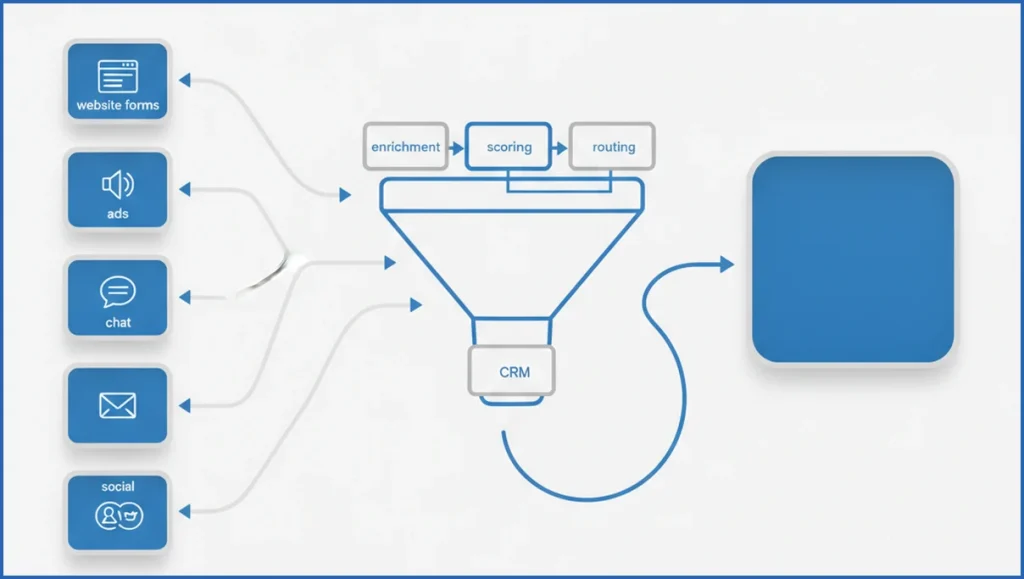
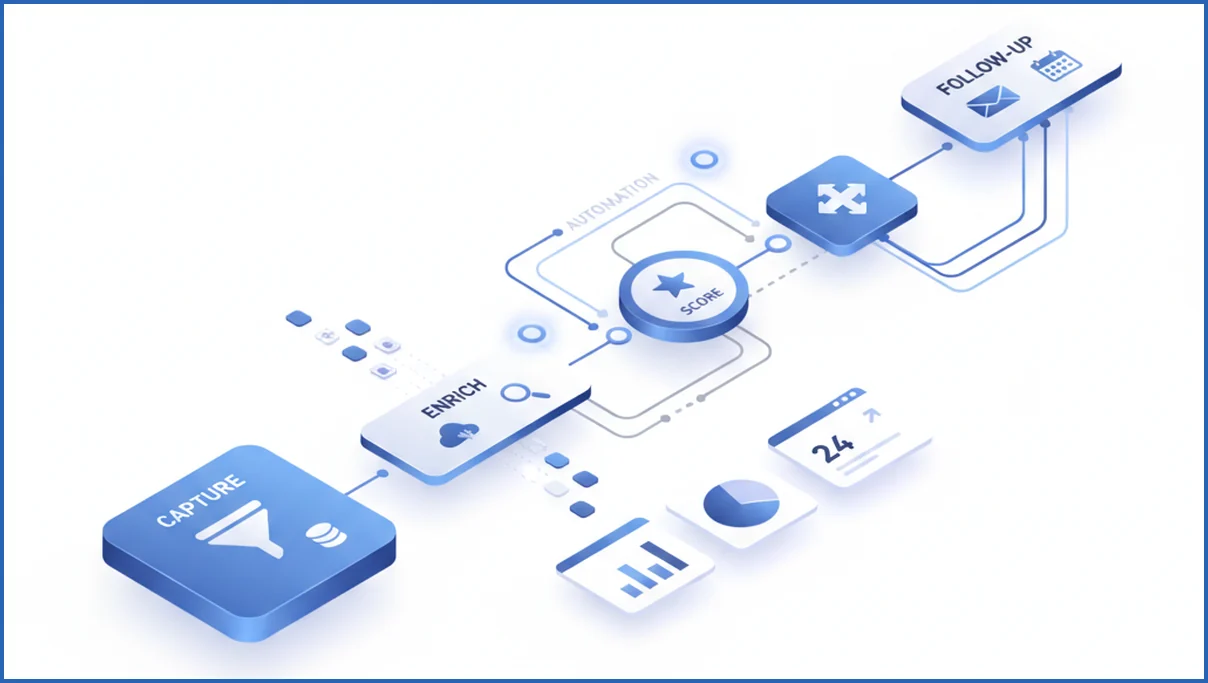
A practical workflow has six stages: capture, enrich, qualify, score, route, and follow up. Keep each stage narrow. For example, a pricing page form can push name, company, and URL into HubSpot, call an enrichment API, then append employee count, industry, and country before scoring starts.
Qualification should combine rules and AI. Rules catch hard filters like unsupported regions. AI reads free-text fields such as “Need migration help for 12 regional sites” and classifies urgency, use case, and likely deal size. That is the same operating idea behind structured AI workflows. The model handles interpretation, while rules keep outputs predictable.
Routing needs clear thresholds. Example: score above 75 goes to sales within five minutes, 45 to 74 enters a two-email nurture, below 45 stays in marketing until intent improves. Follow-up can pull from source and page context, then send tailored copy instead of a generic thank-you.
- Capture lead data from forms, chat, ads, and inbound email.
- Enrich with company, firmographic, and behavior signals.
- Classify intent from free text and page path.
- Score based on fit, urgency, and engagement.
- Route to sales, nurture, or disqualify with reason codes.
- Sync outcomes back to CRM for model tuning.
if lead.fit_score >= 75 and lead.intent == "high":
    assign_owner("sales")
    send_sequence("demo-fast-follow")
elif lead.fit_score >= 45:
    assign_owner("marketing")
    send_sequence("case-study-nurture")
else:
    tag("low-priority")
Use AI to Improve Lead Quality, Not Just Speed
More leads rarely fixes pipeline. Better filtering does. Use AI to detect signals humans miss at scale, such as competitor mentions, migration pain, or budget language inside form notes and call transcripts. Then weight those signals against fit. A 20-person startup asking for enterprise procurement support should not outrank a 500-person buyer with active product interest.
Segment by intent, not just source. Two organic leads can behave very differently if one visited pricing twice and the other bounced after a blog post. Teams already using content strategy planning can map assets to stages, then trigger nurture based on gaps in information instead of fixed time delays.
Choose the Right Stack and Integrations
You need four layers: capture, data, decisioning, and action. Typical stack: Typeform or native forms, HubSpot or Salesforce, enrichment like Clearbit or Apollo, then Zapier, Make, or custom functions for orchestration. If you want model calls inside a traceable workflow, understand how MCP servers work before you wire too many brittle point-to-point automations.
Pick the stack by failure tolerance. No-code tools launch fast, but complex branching gets messy after 12 to 15 scenarios. Custom code gives cleaner logic and logging, but needs ownership. A hybrid model often wins.
| Feature | No-code stack | Custom workflow | Verdict |
|---|---|---|---|
| Setup speed | Fast | Slower | No-code is better early |
| Logic depth | Limited | High | Custom wins for scoring complexity |
| Debugging | Moderate | Better logs | Custom is cleaner at scale |
| Maintenance | Easier for marketers | Needs developer time | No-code is better for small teams |

Launch, Test, and Tune the Workflow
Roll out in one funnel first, usually demo requests or high-intent organic leads. Run the automated path beside your manual process for two weeks. Compare lead score bands, meeting rate, and false positives. If 18% of routed leads still get rejected by sales, your scoring logic needs work.
Review outcomes weekly. Look at time-to-first-response, MQL-to-SQL rate, booked meetings, and closed-won by source. For search-led funnels, Google Search Console MCP helps connect query intent to conversion behavior, which is useful when certain pages attract volume but weak-fit leads.
A Quick Benchmark: What AI Lead Workflows Are Winning Now
The strongest automated lead generation workflows are not chasing maximum form volume. They are compressing time to first qualified touch. In many B2B teams, the winning pattern is simple. Capture intent, enrich the record, score fit, and trigger the next step within minutes. HubSpot, Salesforce, and Clay users often pair website forms with Clearbit-style enrichment, OpenAI summaries, and instant routing to SDRs. The benchmark to watch is response speed plus meeting rate, not raw lead count.
A practical target is first outreach in under 10 minutes for hand-raisers and under 30 minutes for content leads. Teams also win when they remove generic follow-up. Instead, AI drafts messages from page path, firmographic data, and CRM notes. That makes the sequence feel specific without adding manual work. If you want a model for tighter message logic, see automated email marketing workflows.
- Best-performing workflows enrich 70 to 90 percent of inbound records before routing.
- Fast teams push high-intent leads to sales in under 10 minutes, then send personalized follow-up automatically.
- Top setups review meeting-booked rate, SQL rate, and no-show rate weekly, then retrain prompts and scoring rules monthly.
Frequently Asked Questions
What is automated lead generation?
It is the use of software and AI to capture leads, add useful data, assess quality, assign next steps, and trigger follow-up automatically. The goal is not maximum lead volume. The goal is faster handling of real buying signals with less manual work, better consistency, and clearer reporting across marketing and sales.
Can AI qualify leads without hurting accuracy?
Yes, if you keep humans in the loop during setup and use clear constraints. AI is strong at reading open-text responses, spotting intent patterns, and classifying use cases. It should not decide everything alone. Pair model output with firm rules, review edge cases weekly, and feed closed-lost reasons back into the workflow.
Which tools are needed for an AI lead workflow?
You usually need a form or chat layer, a CRM, an enrichment source, an automation platform, and one model layer for classification or personalization. Many teams can start with existing tools plus a few API connections. Add custom code only when routing logic, logging, or scale makes no-code automation hard to manage.
How do you score leads automatically?
Start with three buckets: fit, intent, and engagement. Fit can include company size, industry, and geography. Intent can include pricing views, demo requests, and problem-specific language. Engagement can include email replies or return visits. Assign points, set thresholds, and compare scores against actual sales outcomes every week for the first month.
How do you avoid spammy automation?
Use fewer triggers and better context. Do not send the same sequence to every lead. Reference source, page viewed, or stated problem. Cap message frequency, stop automation when a rep engages, and suppress low-fit contacts early. Good automation feels timely and relevant. Bad automation feels like a volume script with merge tags.
What metrics should you track first?
Track time-to-first-response, MQL-to-SQL rate, meeting-booked rate, and closed-won rate by source. Add false-positive rate if sales rejects many routed leads. Lead volume matters, but it can hide workflow problems. Start with conversion quality metrics, then inspect stage-level delays and drop-offs once the baseline numbers are stable.
If you build this, start with one entry point and one scoring model. A smaller workflow with clean feedback beats a giant automation that nobody trusts.
How long does it take to see results from AI lead generation?
Most teams see early process gains in one to three weeks. That includes faster response times, cleaner records, and better routing. Pipeline gains usually take four to eight weeks because you need enough lead volume to compare meeting and SQL rates. If your traffic is low, expect a longer read period. Start with one workflow, track lift weekly, and validate data quality with GA4 MCP reporting tools.
Next steps for a stronger AI lead workflow
Better automated lead generation comes from tighter decisions, not louder automation. If your workflow enriches leads quickly, scores intent clearly, and routes follow-up fast, quality usually rises with volume. Use a short benchmark window, compare meeting and SQL rates, and refine prompts every month. If you want help pressure-testing your setup, book a free SEO consultation and walk through the workflow step by step.

