
How AI Overviews change what a 3D homepage needs to render
AI Overviews change the job of a homepage. The page still needs strong branding and motion, but it also needs text fragments that can be understood in isolation. A 3D hero cannot be the only expression of the offer. Google’s AI systems look for concise answers, clear service framing, and supporting signals around expertise, use cases, and relevance. Google has described AI Overviews as organizing information from multiple sources, which raises the value of explicit on-page language over implied visual meaning.
For a React Three Fiber homepage, that means rendering more than a canvas shell. The server response should include a descriptive H1, a direct statement of what the company does, and short blocks that answer likely first-click questions. Think in terms of extractable snippets. A sentence like “We build fast, crawlable 3D marketing sites with React Three Fiber and Claude-assisted workflows” gives search systems more to work with than a rotating object and a vague tagline.
It also helps to connect the homepage to deeper, specialized pages. Supporting articles on answer engine optimization or service documentation can reinforce topical clarity. The homepage should render branded trust signals, primary service language, and plain-English outcomes before the user scrolls. If the visual layer fails, the meaning should still survive. That is the safest pattern for both classic rankings and AI-mediated visibility.
Why this 3D homepage had to survive Google’s 2025 updates
Google’s 2025 updates made one thing clear. A homepage cannot rely on visual novelty alone. If React Three Fiber owns the first paint, but Google sees thin HTML, weak copy, or delayed content, rankings become fragile. This build had to keep the 3D layer while preserving crawlable structure, meaningful headings, and text that explained the offer before JavaScript finished loading.
That matters even more because AI-driven search surfaces reward pages with explicit, extractable answers. Google has pushed further into AI Overviews and answer-style results, so the homepage needed visible value statements, service context, and entity signals in plain HTML. That is the same shift discussed in our AI search optimization playbook. The 3D scene could stay, but it had to support the page’s meaning, not replace it.
- Server-render core headline, supporting copy, and internal navigation before the canvas initializes.
- Keep Largest Contentful Paint stable by prioritizing text, compressed textures, and delayed non-critical scene assets.
- Make the homepage quotable with concise copy blocks that search systems can parse without executing interactions.
Frequently Asked Questions
How do AI Overviews affect a 3D homepage’s SEO visibility?
AI Overviews raise the value of visible, crawlable copy on a 3D homepage. If the page leads with only WebGL visuals, Google may have less text to quote or summarize. Render the core offer, audience, and outcomes in HTML before the scene loads. Then use data from Google Search Console analysis to see which queries need clearer homepage language.
What this means for the build
A 3D homepage can still win organic visibility if the spectacle never hides the message. Keep the React Three Fiber experience, but anchor it with server-rendered copy, fast loading assets, and text blocks that answer real search intent. That balance matters more after Google’s 2025 changes, because pages now need to satisfy humans, crawlers, and AI summaries at the same time.
Building an SEO-Friendly 3D Homepage with React Three Fiber and Claude sounds like a conflict between immersive design and search visibility. This refresh shows why that tradeoff is smaller than many teams assume. The real challenge is not WebGL itself. It is making sure the homepage communicates its value fast, renders meaningful HTML early, and stays legible to Google’s newer AI-driven search experiences.
Turning a flat homepage into a scroll-driven 3D world — every minute timestamped.
Six hours. Three full rewrites. Two bugs and two breakthroughs. The exact build log of rebuilding the saveyourclicks homepage as an immersive React Three Fiber experience with Claude — particles that morph on scroll, cards that fly in from deep space, and the one idea that finally made it feel alive. Then — the same day, right after publishing this — the cutover the diary kept warning about: turning a client-rendered WebGL page into one that’s fully crawlable, indexable, and 83% lighter on first load.
- Build time
- 6h 20m
- Bugs fixed
- 2
- Breakthroughs
- 2
- Dead ends
- 2
-
Start
The plan: make the homepage feel like the 3D sites all over Instagram.
Every other reel right now is a scroll-driven 3D website built with AI. I wanted that for the saveyourclicks homepage — particles, depth, motion — but without wrecking SEO. Two ground rules from minute one: build it on a test directory (
/home-v2/) with the real homepage’s content first, and keep all the important text and links — nav, footer, headings — as real DOM outside the animation so nothing that matters lives inside a canvas. If it turned out great, we’d cut over later. -
Dead end⏱ ~20 min
A single-file Three.js scene with a particle hero.
First swing: one self-contained HTML file, a Three.js particle field behind the hero section. It looked like motion — but scroll down and everything below was a completely ordinary page. “Too little,” was the verdict. “There’s no idea behind it.”
What I learned: a particle backdrop isn’t a concept. A few dots drifting behind a static page reads as a screensaver, not an experience. The motion has to mean something across the whole scroll, or it’s just decoration.
-
Dead end⏱ ~20 min
Full-page morphing particles — still bolted onto a static page.
Second swing, still single-file: one particle system that morphs across the whole scroll. Better, but the feedback was sharp and right — “the particles open and close, but the elements behind them just sit there.” The cards weren’t sharp, didn’t move, didn’t rotate around any axis. The background was alive; the page was dead.

The single-file phase: particles drift behind the hero, but the headline and cards are flat and static. Alive in the background, dead in the foreground. What I learned: you can’t bolt motion onto static DOM cards and call it 3D. If the elements aren’t part of the animation, no amount of background particles will rescue it. That meant abandoning the hand-written single file entirely.
-
Eureka ✦
Stop decorating the page. Make the whole page one 3D scene.
The shift: from “a page with a particle background” to “a single scroll-scrubbed 3D scene the DOM rides on top of.”
We threw out the single file and rebuilt it as a real React Three Fiber project — Vite, a proper component tree, an actual build step. The canvas becomes fully pinned and full-screen; scroll scrubs the entire experience. The camera starts in a distant galaxy (
z=48) and flies through space as you scroll, while the particle field morphs from chaos into clusters into a network. Same mechanic as those Instagram sites — but now it’s an engineered scene, not a hand-managed file. -
Bug 01⏱ ~6 min · 🧠 reusable lesson
The page that wouldn’t scroll — drei’s ScrollControls.
- Symptom
- The canvas and nav rendered, but the page content was gone and scrolling was completely dead. No FPS readout, no movement — a frozen screen.
- Root cause
- I’d wired scroll through drei’s
<ScrollControls>, which builds its own custom scroll container. It didn’t mount correctly here, so there was no working scroll context — which meant neither the overlaid content nor the scroll itself worked. - Fix
- Drop
<ScrollControls>entirely. Go back to native browser scroll with the R3F canvasposition:fixedbehind it. Scroll is guaranteed to work, content stays in the real DOM (visible even if WebGL fails), and the bundle dropped from 622 modules to 57.
“Scroll doesn’t work at all.” drei’s custom scroll container never mounted — nav present, content gone, page frozen. -
Eureka ✦
Cards as beads on a cosmic thread — assembled by scroll.
The shift: cards aren’t laid out and then revealed; scroll builds them — each one a bead flying in along a cosmic thread.
Even with native scroll working and particles morphing, one note kept coming back: “I want the cards to appear with scroll, not already be sitting at the bottom of the page while I just scroll past them.” That reframed everything. Instead of pre-placing cards and fading them, each section became a tall
stickyblock that spends its scroll distance assembling its cards in place. A per-frame DOM motion engine flies each card in from deep space (translateZ −560) along a curved arc from alternating sides, blur→sharp, with a blue/violet glow trailing it mid-flight — then settles into a subtle idle float and tilt-toward-the-cursor. Beads on a thread, strung by the scrollbar. -
Bug 02⏱ ~3 min · 🧠 reusable lesson
The animation that silently vanished — one missing
const.- Symptom
- After rewriting the card-entry math, all the card animation disappeared. The cards just sat there, frozen — no error dialog, no obvious crash, nothing in the design that pointed at why.
- Root cause
- While editing the entry logic by hand I accidentally dropped one line —
const start = el._order * STAGGER. Withstartundefined, the animation loop threw aReferenceErroron every frame, which silently killed the entirerequestAnimationFrameloop. One missing declaration took down all the motion. - Fix
- Restore the line. The whole loop came back to life. Reusable lesson: when motion suddenly vanishes with no visible crash, suspect a JavaScript throw inside the rAF loop — a single per-frame exception takes the whole animation down quietly.
-
Shipped
Live on the test directory — smooth, glowing, and reusable.
The last hour was polish, not features. To kill the lag without touching the look: skip the blur and glow work for off-screen sections, cap
devicePixelRatioat 1.5, drop particles from 7,200 to 5,000. Then the final coat of paint — cinematic Bloom so the particles and card halos actually glow (version-pinnedpostprocessingbecause the current release needs a newer Three.js than the scene runs, desktop-only to stay light). It went live at/home-v2/as anoindextest: native scroll, sticky sections that assemble cards, a dramatic arc entry from deep space, a scroll-scrubbed camera fly-through, and Bloom on top — 283KB gzip. The build even handed back a short English prompt that recreates the whole pattern, so the same scrollytelling homepage can be cloned onto another site in one shot.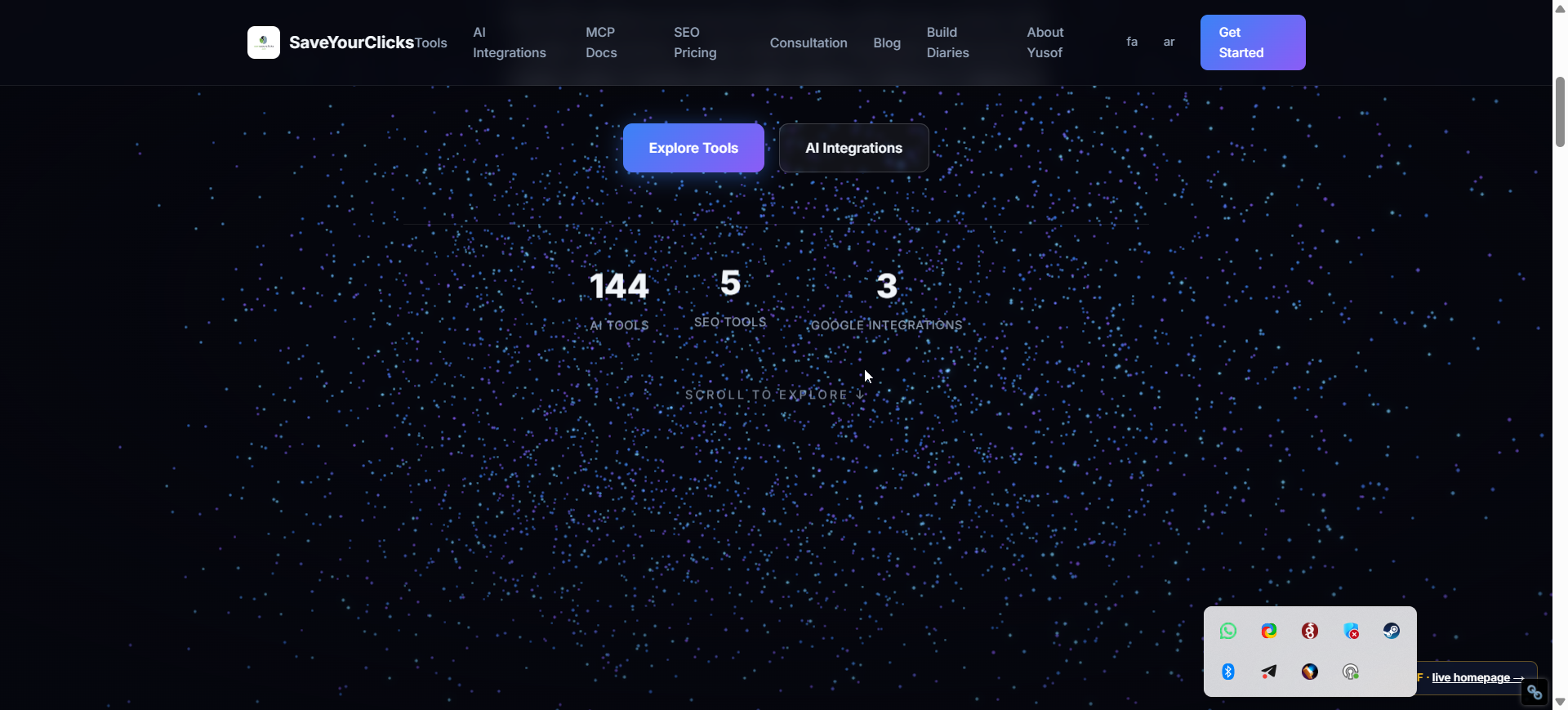
The shipped hero: a full WebGL starfield with the camera flying through it, the stats floating in 3D, Bloom making the particles glow. 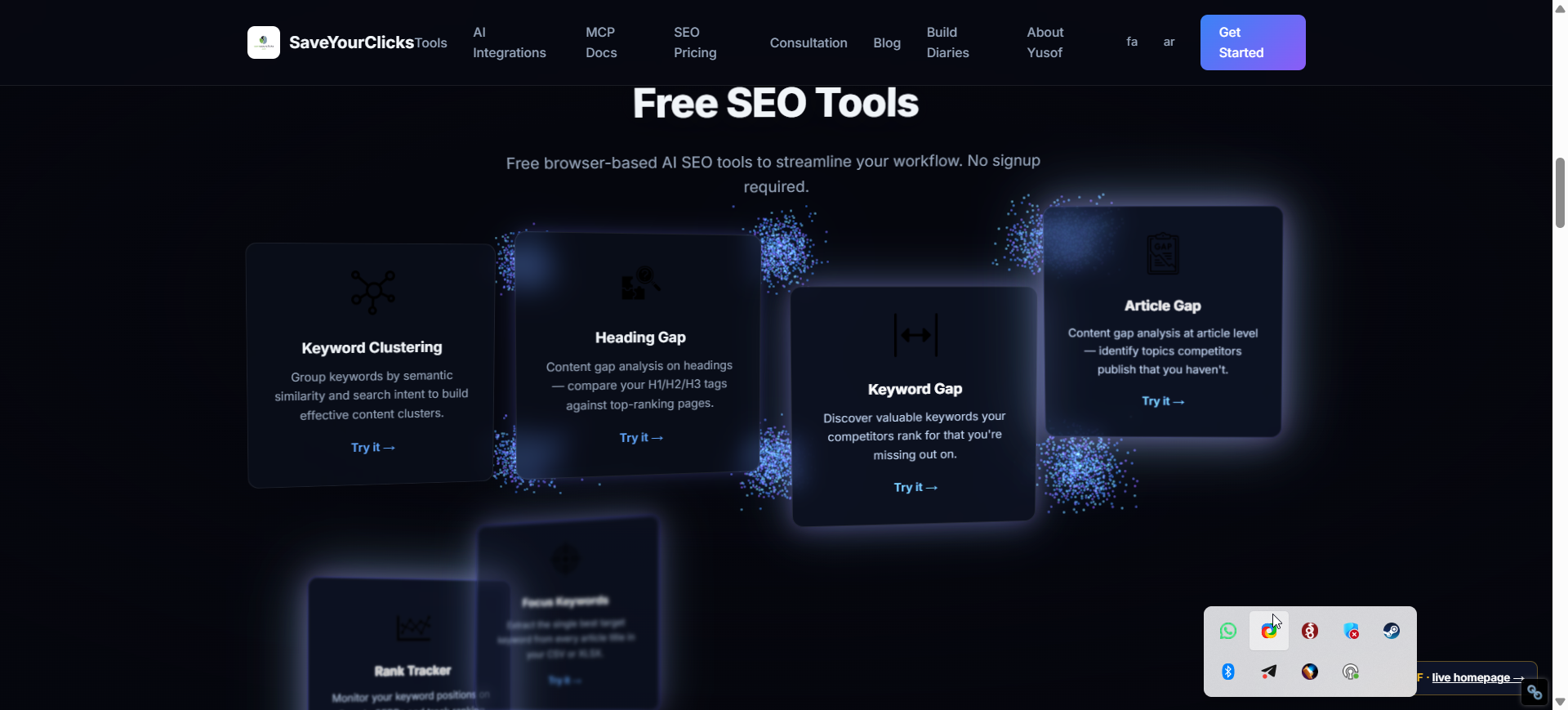
The tools section after scroll-assembly: each card has flown in from deep space along its arc and settled beside its own particle cluster. -
Part 2 · The cutover
The diary said we’d need prerendering before going live. The same day, we did.
Right after publishing the build log above, the verdict came in: it looked good enough to be the homepage, not just a test directory. So we cut over. But everything this diary kept flagging in passing — “R3F renders client-side,” “it would need prerender or SSR,” “noindex on purpose because it duplicates the live homepage” — suddenly stopped being a footnote and became the actual job. Here’s the hour that turned the test build into the real, indexable saveyourclicks.com.
-
Bug 03⏱ ~5 min · 🧠 reusable lesson
The homepage Google would have seen: an empty
<div>.- Symptom
- The page looked full of content and links in the browser — but
curlas Googlebot returned 967 bytes:<div id="root"></div>and nothing else. No headline, no nav, no links. And the test build still carried<meta name="robots" content="noindex,nofollow">. Swapping it onto/as-is would have told Google to deindex the homepage. - Root cause
- This is the catch the whole diary danced around: keeping content as “real DOM” only helps if that DOM exists in the HTML. With client-side React, the DOM is built by JavaScript after load — so crawlers that don’t execute JS (Bing, social and AI bots) and the all-important first paint see an empty shell. “Crawlable in principle” isn’t crawlable.
- Fix
- Stop shipping an empty shell. Render the real DOM at build time and ship that — see the next step.
-
Eureka ✦
Prerender at build time — ship the rendered DOM, hydrate the 3D after.
The shift: the canvas doesn’t need to be in the HTML — the content does. So render once, headless, and bake the result into
index.html.We added a tiny post-build step: after
vite build, a script boots the site in headless Chrome (puppeteer), waits for React to mount the real content, then writesdocument.documentElement.outerHTMLback intodist/index.html. No SSR rewrite, no framework migration — oneprerender.mjs. The shipped HTML now contains the full headline, every section, and all 45 links on the first byte; the browser still boots React over it and the 3D comes alive exactly as before. Same approach Google calls “dynamic rendering,” except everyone — bots and humans — gets the identical pre-rendered HTML, so there’s nothing cloaked. -
Bug 04⏱ ~10 min · 🧠 reusable lesson
Headless Chrome has no GPU — and the dead canvas took the whole page down.
- Symptom
- First prerender run captured… nothing.
#rootwas empty in the snapshot, the content selector timed out. The console was full ofTHREE.WebGLRenderer: A WebGL context could not be created. - Root cause
- Headless Chrome couldn’t create a WebGL context, so
<Canvas>threw — and because the canvas and the content were siblings in one React tree, that throw unmounted the entire tree. The decorative backdrop was taking the real content down with it. (Worth noting: that meant any real visitor without WebGL would have seen a blank page too.) - Fix
- Wrap the canvas in a one-line error boundary — if WebGL fails, the backdrop quietly drops out and the content renders untouched. That unblocked the prerender and turned a latent blank-screen bug for low-end devices into graceful degradation. Reusable lesson: never let a decorative WebGL layer share a crash with your content — isolate it behind a boundary.
-
Eureka ✦
Keep the real SEO head, then split the bundle: 283KB → 49KB on first load.
The shift: the new design is only the
<body>. The homepage’s head — its years of SEO — has to come along untouched.A naïve file swap would have nuked the old static homepage’s entire
<head>. So we ported it wholesale into the build template: real<title>,robots: index,follow, self-referencing canonical, Open Graph, Twitter cards,hreflangfor en/fa/ar, the WebSite JSON-LD, and the GTM container — with the prerender stripping the runtime-injected GTM tag so analytics doesn’t double-fire. Then the performance note this diary promised: the 1MB / 283KB-gzip bundle got code-split — Three.js and the R3F layer became async chunks loaded only when the lazy backdrop mounts. First-load JS dropped from 283KB to 49KB gzip (−83%); the content paints, the 3D arrives after. -
Shipped — for real
Live at the real homepage — same design, now crawlable and indexable.
The 3D scroll experience is now
saveyourclicks.com/itself, not a test directory. As Googlebot, the homepage went from 967 empty bytes to 16KB with 45 links and 17 headings in the raw HTML,robots: index,follow, full Open Graph and JSON-LD intact — and a 49KB first-load instead of 283KB. The old static homepage is kept as a one-command rollback, and the sitemap’slastmodwas bumped so Google re-crawls. The diary’s opening rule — “without wrecking SEO” — held all the way to production: every word and link a search engine or AI crawler needs is in the first response, and the galaxy still flies by on scroll.
The honest accounting
Where the 6 hours actually went.
The bugs were quick. The real cost was iterating the feel of the motion — and I was building blind, so every change meant rebuild, deploy, and wait for a human to tell me if it landed.
- Setup
- ~30m
- Debug bugs
- ~40m
- Dead ends
- ~68m
- Eureka moments
- ~30m (worth it)
- Polish & ship
- ~210m
Takeaway: more than half the time went into iterating the motion feel through blind rebuild-deploy-feedback loops; jumping straight to “full R3F + native scroll + a per-frame DOM motion engine” instead of two single-file detours would have shortcut the whole first half.
Questions you might have
The five real questions about this build.
Why React Three Fiber instead of a single HTML file with Three.js?
A single-file Three.js scene is fine for a particle backdrop, but the moment you want the page’s real content — cards, headings, links — to be part of the 3D motion, hand-managing the DOM and the render loop in one file gets unmanageable. React Three Fiber gives you a real component tree, a proper build, and clean separation between the WebGL scene and the DOM overlay. That structure is what let the cards become part of the animation instead of static boxes behind it.
Does a 3D WebGL homepage hurt SEO?
It doesn’t have to — but keeping content as “real DOM” isn’t enough on its own. With client-side React, that DOM is built by JavaScript, so the raw HTML a crawler first receives is an empty <div id="root">. When this build became the live homepage, the fix was a build-time prerender: headless Chrome renders the page once and the full HTML — headline, sections, all 45 links — gets baked into index.html. Crawlers and the first paint get the real content immediately; the browser still hydrates the 3D on top. Live, the homepage went from 967 empty bytes to 16KB of crawlable HTML with robots: index,follow.
Why native browser scroll instead of drei’s ScrollControls?
drei’s ScrollControls builds its own custom scroll container. In this build it didn’t mount cleanly, so the content disappeared and the page stopped scrolling entirely. Switching to native browser scroll with a fixed canvas behind it fixed both problems at once — scroll always works, content lives in the real DOM, and it dropped the bundle from 622 modules to 57. A library’s scroll hijack is rarely worth giving up native scroll.
What’s the performance cost of a React Three Fiber homepage?
The R3F + Three + postprocessing bundle landed around 1MB raw / 283KB gzip — heavy to load up front. Cheap wins kept the runtime smooth: skip the per-frame blur and glow work for off-screen cards, cap devicePixelRatio at 1.5, drop particle count from 7,200 to 5,000, and run Bloom on desktop only. Then at cutover we code-split the 3D: Three.js and the R3F layer became async chunks loaded only when the lazy backdrop mounts, so first-load JS dropped from 283KB to 49KB gzip — the content paints first and the WebGL scene streams in after.
How do you prerender a React Three Fiber site without breaking the 3D?
A small post-build script (prerender.mjs) boots the built site in headless Chrome, waits for the content to mount, and writes the rendered HTML back into index.html. Two gotchas: headless Chrome usually has no GPU, so <Canvas> throws and — if it shares a React tree with your content — takes the whole page down; wrap it in an error boundary so the backdrop drops out and the content still renders. And strip any runtime-injected third-party tags (like the GTM script the page injects on load) from the snapshot so they don’t double-fire on the client. The canvas itself never needs to be in the HTML — only the content does.
Can I reuse this scroll-driven 3D design on another site?
Yes. The whole thing is one reusable pattern: a fixed WebGL canvas, native scroll, sticky sections that “assemble” their cards as you scroll, and a per-frame DOM motion engine that flies each card in from depth along a curved arc. The end of this build produced a short English prompt describing exactly that, so the same scrollytelling homepage can be cloned onto another site in one shot.