
Last updated: August 2026
Google Search Console MCP Setup: A Practical Playbook starts making sense when you treat GSC as a live source for questions, not a dashboard for exports. With Claude and other MCP clients, you can inspect clicks, queries, pages, and trend shifts inside the same conversation where you plan fixes. That shortens analysis cycles, reduces copy paste work, and helps SEO teams turn raw Search Console data into faster decisions with less reporting overhead.
TL;DR
- Understand what Google Search Console MCP does for SEO workflows.
- Choose the right setup path: OAuth, service account, or hosted.
- Configure access safely and verify the connection works.
- Use core tools to inspect queries, pages, and indexing issues.
- Avoid common setup mistakes that break access or return empty data.
What Google Search Console MCP Is and Why It Matters
MCP stands for Model Context Protocol. It gives an AI client a standard way to call tools and fetch structured data. If you want the wider framing, this MCP server explanation covers the model well. In practice, a Google Search Console MCP server exposes Search Console actions like site performance lookups, page reports, and date-range comparisons.
That matters because AI answers improve when they can inspect your real data, not just your prompts. A content lead can ask why a URL lost 28% clicks in 14 days. An SEO can compare branded and non-branded query shifts without opening three tabs. This is where a Claude MCP workflow starts to feel operational, not experimental.
Used well, google search console mcp becomes a thin layer between your assistant and the API. You still need sound analysis. But you save the repetitive work of exporting, filtering, and reformatting. For teams building an AI-assisted stack, a dedicated Google Search Console MCP server is one of the most practical starting points.
Choose the Right Setup Path for Your Team
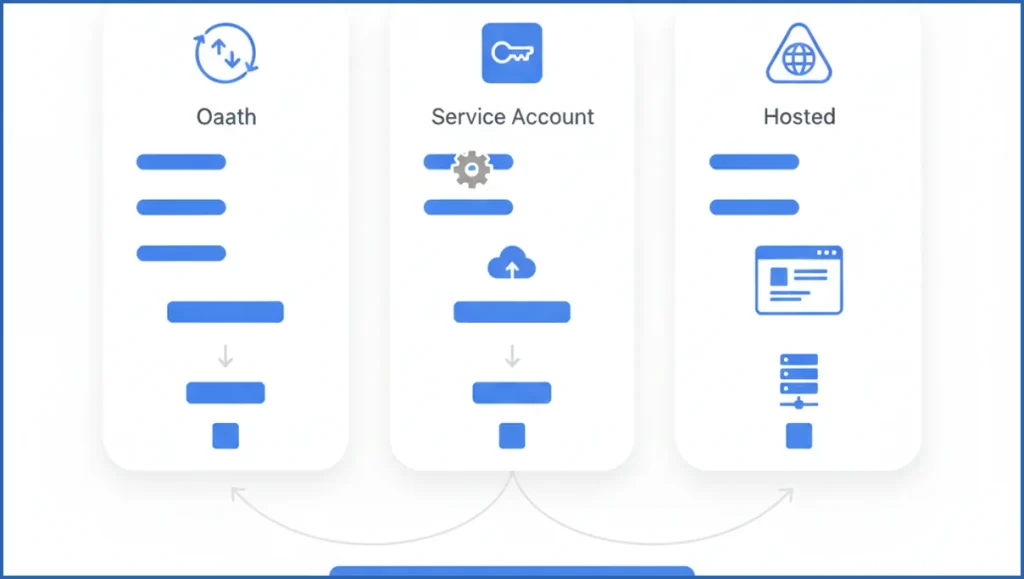
You usually have three paths: OAuth, service account, or hosted. OAuth is the simplest for a solo user. You sign in with Google, approve scopes, and the MCP client stores a refresh token locally. That is fine for a consultant using one laptop and a few properties.
Service accounts fit team systems better, but only when the property type and permissions cooperate. Some Search Console setups still require careful ownership mapping, and many failures come from assuming a service account can see a property by default. Hosted options reduce local setup pain, but you trade control for convenience.
Here is the honest version. OAuth is easiest. Service accounts are cleaner for repeatable internal tooling. Hosted is fastest when non-technical users need access. If your team also pulls GA4, a parallel GA4 MCP setup helps keep reporting in one place.
| Feature | OAuth | Service Account | Hosted | Verdict |
|---|---|---|---|---|
| Setup speed | Fast | Medium | Fastest | Hosted wins for speed |
| Security control | User-level | Strong for teams | Depends on vendor | Service account wins for internal systems |
| Beginner fit | Best | Harder | Good | OAuth is the default pick |
Prerequisites Before You Start
Before setup, confirm four things. First, you have a Google account with Search Console access to the target property. Second, you know whether the property is domain-level or URL-prefix. Third, you have your MCP client ready, such as Claude Desktop. Fourth, you can edit local config files or environment variables.
Permissions cause most wasted time. Check that your account is at least a full user on the property, and preferably an owner if you are testing setup. If you plan to script broader SEO workflows later, this Search Console analysis playbook is a useful benchmark for the kinds of queries you will want to run.
Set Up Google Search Console MCP Step by Step
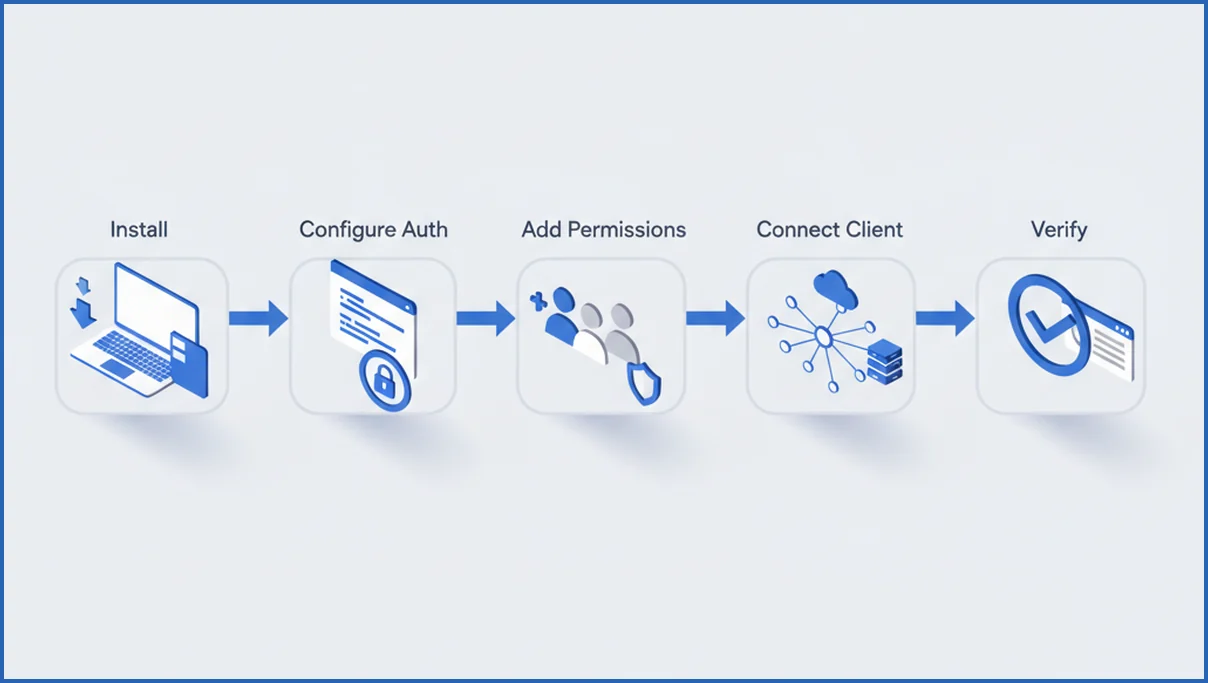
Start with the MCP server package or hosted endpoint you chose. For a local install, add the server to your client config, then define auth values. Keep credentials in environment variables, not hardcoded JSON pasted into the config file.
- Install the MCP server or copy the hosted connection details.
- Create Google API credentials for OAuth, if your server requires them.
- Grant the Google account access to the Search Console property.
- Add the server entry to your MCP client config.
- Restart the client and complete the auth flow.
A minimal local config often looks like this:
{
  "mcpServers": {
    "gsc": {
      "command": "npx",
      "args": ["-y", "your-gsc-mcp-server"],
      "env": {
        "GOOGLE_CLIENT_ID": "your-client-id",
        "GOOGLE_CLIENT_SECRET": "your-client-secret"
      }
    }
  }
}
After restart, your client should show the server and available tools. If you are using Claude Desktop, approve the browser auth request and wait for token storage to complete. On a good setup, this takes 5 to 10 minutes. If you want a broader stack view, SaveYourClicks AI SEO tooling shows how teams combine GSC with adjacent MCP workflows.
Test the Connection and Run Your First SEO Queries
Do not trust a green status alone. Run a real query. Ask the client for clicks, impressions, CTR, and average position for one verified property across the last 28 days. Then ask for top pages by clicks, and top queries for one URL. If the server returns structured rows, your connection works.
Good first prompts are specific. Try: “Show queries with positions 8 to 15 and at least 50 impressions in the last 30 days.” Or: “Compare clicks for /blog/slug/ in the last 14 days versus the prior 14.” This is the same habit that makes AI-assisted keyword clustering useful. Clear constraints produce better output.
Prompt:
For property sc-domain:example.com, list pages with over 200 impressions,
CTR under 1.5%, and average position between 4 and 12 in the last 28 days.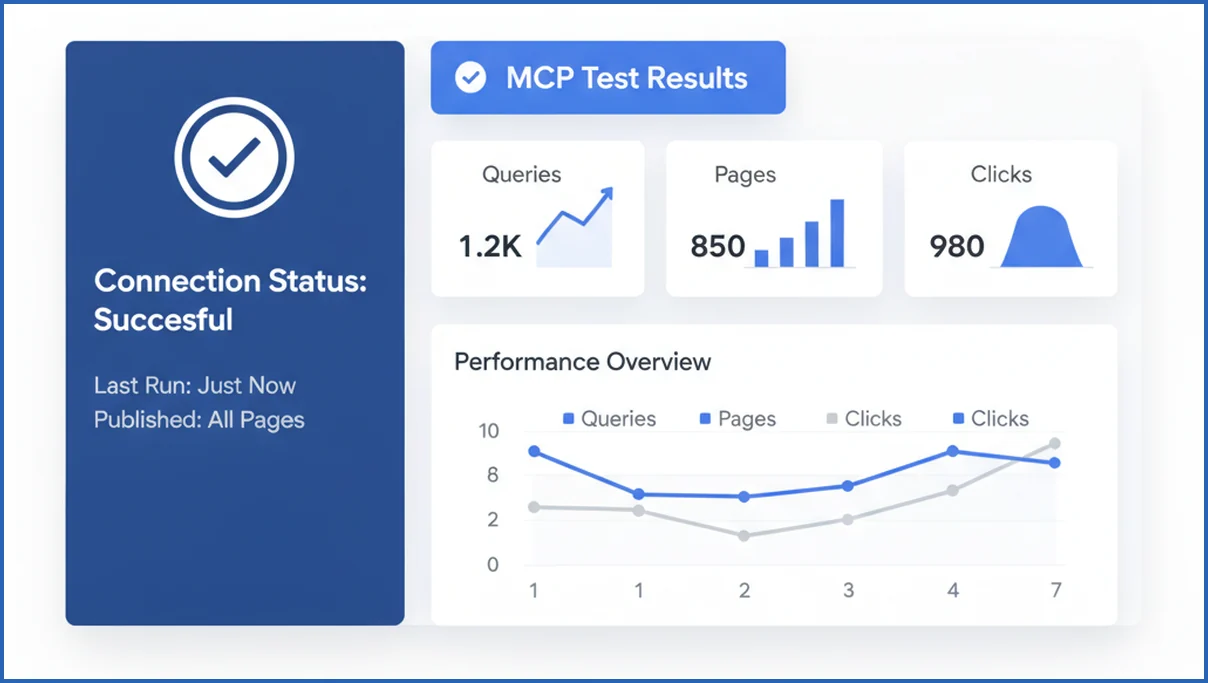
Use Cases That Save Time for SEOs
The obvious use case is reporting, but the bigger win is triage. You can ask the model to find pages that lost clicks week over week, group them by template, and suggest whether the issue looks like ranking loss, CTR loss, or query drift. That saves an hour each time you review a large site.
Another strong use case is content refresh planning. Pull URLs with position 6 to 12, strong impressions, and weak CTR. Then pair those pages with an automated content brief workflow to turn GSC evidence into actionable rewrites. For editors, that is much better than “update old posts” as a vague monthly task.
Troubleshooting and Security Best Practices
If MCP returns no data, check the property identifier first. A domain property like sc-domain:example.com is not the same as https://www.example.com/. Next, confirm the signed-in account has access to that exact property. Empty rows often mean wrong property scope, not a broken server.
Auth errors usually come from expired refresh tokens, redirect URI mismatch, or missing consent screen setup in Google Cloud. Permission errors often mean the API credential belongs to one Google account while Search Console access belongs to another. Keep scopes narrow, rotate secrets when staff changes, and store credentials in your OS keychain or secret manager.
For client work, use separate credentials per workspace when possible. That limits blast radius and makes revocation clean. If your process feels brittle, simplify it. OAuth on one operator machine beats a fancy setup nobody can maintain.
Claude Desktop vs other MCP clients
Claude Desktop is usually the easiest starting point for Google Search Console MCP because the product and protocol are tightly associated in most tutorials. The setup path is straightforward, and prompt driven analysis feels natural once your server is connected. For solo consultants or in house SEOs, that can be enough. You get direct access to query and page level data without building a separate reporting layer first.
Other MCP clients can still make sense. Some are better for engineering heavy teams that want logs, custom tool routing, or deeper local development controls. Others may fit organizations standardizing on a different AI workspace. The tradeoff is usually documentation depth and troubleshooting speed. Claude Desktop often has the most examples, while alternative clients may require more trial and error when auth, scopes, or JSON config break.
A practical rule is simple. Choose Claude Desktop when you want the shortest path from setup to useful SEO analysis. Choose another client when governance, developer tooling, or cross app orchestration matters more than convenience. If your team needs a quicker launch, a ready made Google Search Console MCP can reduce setup time before you decide whether to standardize elsewhere.
When to switch from a hosted connector to your own MCP server
A hosted connector is often the right first step. It helps you validate demand before anyone spends time on maintenance. If your team only needs a few recurring prompts, such as weekly loser pages, top queries, or CTR checks, hosted is usually enough. Many SEO teams stay there for months because it removes server upkeep, deployment work, and most authentication headaches.
Switch when one of three things happens. First, you need tighter control over credentials, logging, or client specific isolation. Second, you want custom tools beyond standard GSC calls, such as blending Search Console with internal content inventory. Third, usage becomes frequent enough that prompt workflows need predictable latency and stable schemas. At that point, your own server can be worth the overhead. A solid primer on architecture helps before that move, especially if stakeholders still ask what MCP actually does behind the scenes. See MCP server explained for the technical model.
For many teams, the tipping point is not traffic size. It is workflow complexity. A site with 5,000 monthly clicks may justify a custom server if five people use it daily. Meanwhile, a site with 500,000 clicks may still be fine on hosted if one strategist runs a simple monthly review.
What Claude Desktop’s latest MCP support changes for GSC
Claude Desktop’s newer MCP support makes Google Search Console workflows feel less like a workaround and more like a native research loop. Instead of juggling browser tabs, exports, and pasted snippets, you can ask Claude to inspect queries, pages, devices, and date ranges from an MCP server inside the same session. Anthropic’s MCP documentation also makes local and remote server patterns clearer than earlier releases, which lowers setup friction for SEO teams (per Anthropic docs).
For GSC specifically, that means faster analysis on jobs that used to take 20 to 40 minutes. You can compare branded versus non branded queries, find declining URLs, or isolate country level shifts without rewriting the same prompt five times. If you are still learning the protocol, this complements a broader Claude MCP guide before you customize your own workflow.
- Fewer manual exports when reviewing clicks, impressions, CTR, and average position
- Better conversational follow ups, such as refining from sitewide trends to a single directory
- Cleaner handoff between setup, analysis, and reporting inside one Claude Desktop session
Frequently Asked Questions
Is Google Search Console MCP safe to use with client accounts?
Yes, if you treat it like any other production data connection. Use separate Google accounts or separate credential sets for each client group, keep tokens off shared machines, and remove access when contractors leave. The main risk is sloppy credential handling, not MCP itself. Hosted tools need one extra check. Review where tokens are stored and who can access logs.
Do I need coding skills to set up Google Search Console MCP?
Not much. You do need to edit a config file, set environment variables, and follow an auth flow. That is usually enough. Where people get stuck is Google Cloud setup, not code. If you can follow a JSON example and confirm property access in Search Console, you can handle a basic OAuth setup without writing software.
Which authentication method is easiest for beginners?
OAuth is the easiest starting point for most people. It mirrors the sign-in flow you already know, and it works well for one user testing one or two properties. Hosted options can be even easier, but only if you trust the provider and understand the storage model. Service accounts are usually not the first choice for a beginner setup.
Why does MCP return no data after setup?
The usual causes are wrong property format, missing Search Console permissions, or a date range with little data. Check whether your property is a domain property or a URL-prefix property. Then confirm the connected Google account has access to that exact property. Also test a broad 90-day window before assuming the integration failed. Narrow filters can hide valid data.
Can I use Google Search Console MCP in Claude Desktop?
Yes. Claude Desktop is one of the most common MCP clients for this setup. You add the server definition to the local MCP config, restart Claude Desktop, and complete the authentication step. After that, Claude can call the server tools directly. The exact config shape varies by server package, so use the instructions that match your chosen implementation.
What permissions are required for Search Console access?
At minimum, the Google account used for auth needs access to the Search Console property you want to query. Full user access often works for reading performance data, though owner access helps during setup and validation. The critical point is matching the authenticated identity to the verified property. API credentials alone do not grant Search Console visibility.
How is MCP different from the Search Console API?
The Search Console API is the underlying data interface from Google. MCP is the protocol layer that lets an AI client call tools in a standard format. Think of MCP as the connector pattern, not the data source itself. You still depend on the API and its permissions. MCP just makes the data easier to use inside AI-assisted workflows and repeated prompts.
Your next step should be small and testable. Connect one property, run three queries, and save the prompts that answer a recurring SEO question. If setup takes longer than 20 minutes, stop and check property scope and account permissions before changing anything else.
Can I connect Google Search Console MCP to multiple Claude workspaces?
Yes, in many cases you can, but the exact setup depends on how your MCP server handles authentication and session storage. If you use one shared Google account, each Claude workspace may still need its own connection step. For client work, separate credentials or isolated server instances are usually safer. If your team is planning broader shared AI operations, map access rules first with marketing agents workflows.
Next steps for a cleaner GSC MCP workflow
The best setup is the one your team can trust and repeat every week. Start with the client and auth method that get you to live data fastest. Then decide whether hosted access is enough or whether custom control matters more. Once the connection works, build a short prompt library for page drops, query wins, and CTR gaps so Google Search Console becomes part of daily SEO operations.

