Last updated: July 2026
Claude MCP Guide: How It Works and Why It Matters starts with a simple reality. AI becomes more valuable when it can act on real tools and data, not just generate text. Claude MCP gives Claude a standard way to connect with systems like Google Search Console, GA4, internal files, and business tools. That changes Claude from a helpful assistant into a workflow layer that can analyze, retrieve, and support action inside one conversation.
TL;DR
- Claude MCP connects Claude to external tools and data sources.
- It standardizes how AI apps request context and actions.
- Setup is simpler when you understand hosts, servers, and tools.
- The biggest wins are automation, consistency, and better workflows.
What Claude MCP Is and Why It Exists
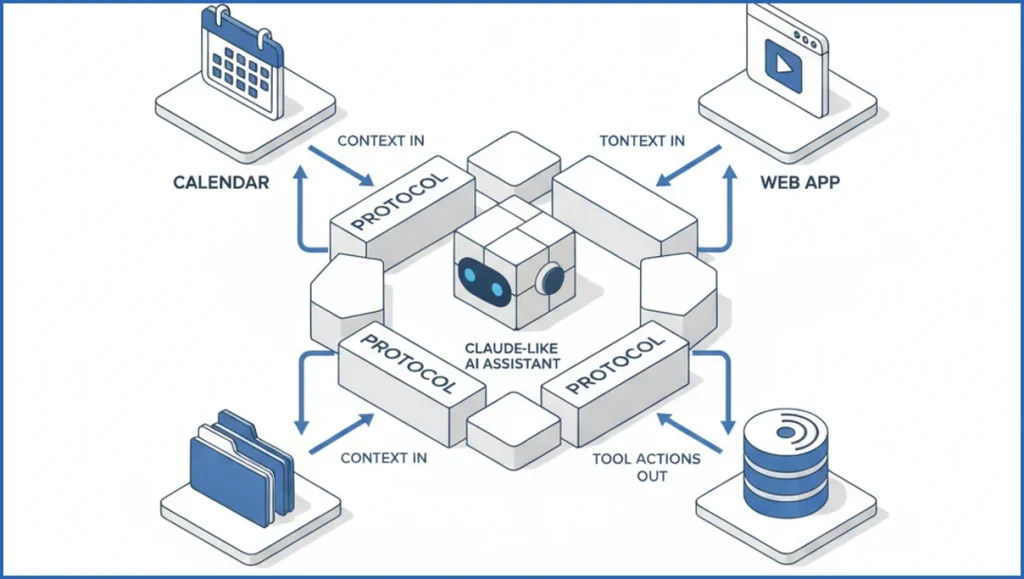
Claude MCP stands for Model Context Protocol. Anthropic introduced it as a standard way for AI apps to talk to external systems. Instead of every tool building a one-off integration, MCP gives Claude a shared pattern for discovering tools, requesting context, and taking actions. If you already grasp how MCP servers work, Claude MCP is the practical layer where that standard becomes useful.
That matters because most valuable work lives outside the chat box. SEO teams need rankings, analytics, briefs, CMS data, and internal docs. Claude MCP lets one model pull those sources into a session without hard-coding each workflow from scratch. A live example is a Google Search Console MCP setup that exposes query, page, and click data directly to Claude for analysis.
How the Model Context Protocol Works
The architecture is simple once you separate roles. The host is the app where Claude runs. The server exposes tools or data. Claude, acting through the host, asks what tools exist, reads their schemas, then sends structured requests. The server returns data or action results in a standard format.
Context is the key idea. MCP does not just bolt on a command runner. It gives Claude a clean way to inspect available capabilities and decide when to use them. That makes workflows more reliable than copy-pasting raw exports into a chat. For teams building AI search workflows, this is closely tied to how marketing agents are evolving.
A stripped-down request flow looks like this:
1. Host connects to MCP server
2. Server returns tool list and schemas
3. User asks Claude: "Find pages with high impressions and CTR under 1.5%"
4. Claude selects the matching tool
5. Host sends structured tool request
6. Server returns rows
7. Claude explains findings and next actions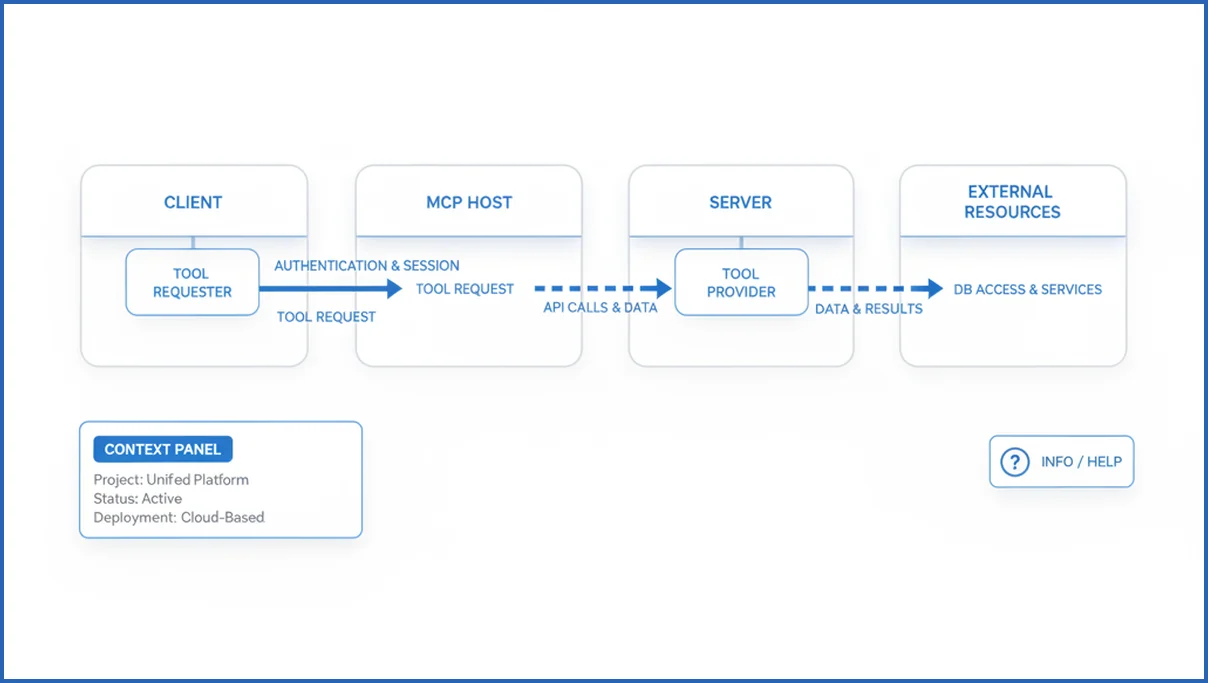
What You Need Before You Set Up Claude MCP
Start with three checks. First, confirm your host supports MCP. Second, pick a server that matches the job, such as files, analytics, or internal APIs. Third, define permissions before you connect anything. Teams often rush past scope, then wonder why Claude can access the wrong dataset or cannot write where expected.
For SEO work, the usual stack is Claude Desktop or another MCP-capable host, a local or remote server, API credentials, and a test prompt. If your goal is reporting, a GA4 MCP server is useful. If your goal is search analysis, Search Console is usually the better first connection.
Step-by-Step: Connecting Claude MCP to a Tool Server
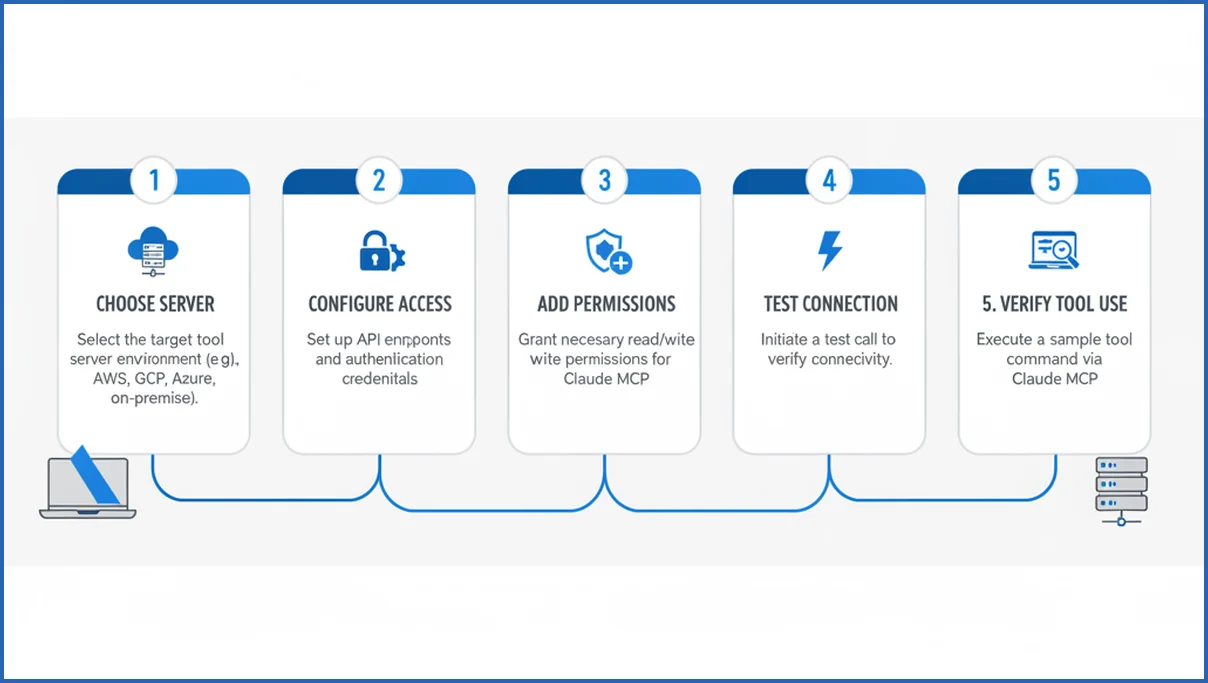
Use a narrow first setup. Do not start with six servers and broad permissions. Pick one server, one dataset, and one test task. That keeps debugging sane and makes failure obvious.
- Choose a server. For example, a Search Console MCP server that exposes query and page reports.
- Configure access. Add credentials, property IDs, and any required environment variables.
- Add permissions. Decide read-only or write access. Read-only is usually enough for SEO analysis.
- Connect the host. Point Claude to the server config and restart the host if needed.
- Test with one prompt. Ask for a specific output, not a vague summary.
A practical test prompt could be: “List 20 queries with more than 500 impressions, CTR below 2%, and average position between 4 and 12.” That output is immediately useful for title testing and content refreshes. If you want a deeper reporting flow, this Search Console analysis playbook shows the kind of decisions Claude can support once the connection works.
If your config uses a local JSON file, it often looks like this:
{
  "mcpServers": {
    "gsc": {
      "command": "npx",
      "args": ["saveyourclicks-gsc-mcp"],
      "env": {
        "GSC_PROPERTY": "sc-domain:example.com"
      }
    }
  }
}
Common Limits, Risks, and Troubleshooting Tips
The first limit is permission scope. Claude can only do what the server exposes. If a tool is read-only, the model cannot update records. The second limit is reliability. API quotas, expired tokens, and malformed tool schemas break flows fast. Keep logs on, test one tool at a time, and validate raw responses before trusting the summary.
Unsupported assumptions cause many failures. Claude may infer a tool can filter by date, but the schema may not include that parameter. Check the actual tool definition. For broader workflow planning, good automation software reviews often reveal the same trade-off: powerful systems fail when observability is weak.
Best Use Cases for Claude MCP in Real Workflows
The strongest use cases combine live data with repeatable prompts. SEO is an obvious fit. Claude can inspect GSC queries, group page issues, draft recommendations, and hand back a prioritized list. Content teams can pair that with keyword clustering workflows to move from raw search data to page plans in one session.
Internal knowledge lookup is another strong fit. A company can expose docs, SOPs, and product specs through a private server, then let Claude answer with current internal context. Automation also gets better when the model can read, decide, and trigger a bounded action. The best setups are not fully autonomous. They are constrained, logged, and easy to audit.
How MCP is changing Claude workflows in 2025
In 2025, MCP is changing Claude workflows by moving the model closer to the systems where work already happens. Instead of copying CSV exports, pasting screenshots, or rewriting requests for each app, teams can let Claude query tools directly and respond with grounded outputs. That shift matters most when a task spans several steps, such as checking rankings, validating traffic impact, and drafting next actions from the same conversation.
For SEO and growth teams, this means fewer disconnected prompts and more operational routines. A marketer can ask Claude to inspect query trends in Google Search Console, compare them with GA4 engagement, and flag pages needing updates. That is more useful than generic advice because the response can reflect live inputs. If you need the analytics side of that stack, the GA4 MCP setup gives a concrete example of how Claude can read session and landing-page data.
MCP also changes workflow design. Teams can build one server for internal docs, another for reporting APIs, and another for task execution. Claude becomes the reasoning layer across those sources. This is similar to the wider move toward agentic software, where models coordinate tools instead of only generating text in isolation, as discussed in this marketing agents overview. In practice, the payoff is speed, but the deeper benefit is consistency. A shared protocol makes repeated workflows easier to maintain, test, and expand.
What’s new in Claude MCP with Anthropic’s latest updates
Anthropic’s latest MCP updates make Claude feel less like a chat window and more like an active work surface. The biggest shift is smoother tool use across longer sessions, so Claude can keep context while calling external systems, summarizing outputs, and deciding the next step. Anthropic has positioned MCP as a standard bridge between models and tools, which matters because it reduces one-off integrations and makes setup more reusable across teams (per Anthropic docs).
For practical users, the update is less about a flashy new button and more about reliability. Claude can work with structured outputs, pass cleaner arguments to servers, and handle multi-step requests with fewer retries in many cases. That improves workflows like pulling Search Console queries, comparing them with GA4 landing pages, and drafting actions in one thread. If you want live marketing use cases, MCP servers for Claude show how this connects real Google data sources to everyday analysis.
- Longer, steadier tool-driven sessions with less context loss in multi-step tasks.
- Cleaner server interactions through a shared protocol instead of custom connectors.
- More practical workflows for SEO, analytics, internal knowledge, and reporting.
Frequently Asked Questions
What does Claude MCP stand for?
Claude MCP refers to Claude using the Model Context Protocol. MCP is the standard that lets an AI host discover external tools, read their schemas, and send structured requests. In practice, it means Claude can work with files, APIs, dashboards, and internal systems without each integration needing a custom format.
Is Claude MCP the same as a plugin system?
Not exactly. A plugin system usually describes one product’s own extension model. MCP is a protocol, so it aims to standardize communication across different hosts and servers. The outcome feels similar because Claude gains new capabilities, but the underlying idea is broader and more portable than a typical plugin marketplace.
Do I need coding skills to use Claude MCP?
Not always. Some hosts and servers offer guided setup, especially for common tools. Still, basic technical comfort helps. You may need to edit a config file, add environment variables, or troubleshoot authentication. If you can follow API documentation and read simple logs, you can usually get through a standard setup.
Can Claude MCP connect to private company data?
Yes, if your team exposes that data through an MCP server and controls access correctly. That can include internal docs, CRM records, product databases, or reporting systems. The important part is governance. Use narrow permissions, logging, and role-based access so the model only sees what a user should be allowed to access.
What is the difference between a host and a server?
The host is the application where Claude runs and where the user interacts with it. The server is the external service that exposes tools or data through MCP. A simple way to think about it: the host asks, the server answers. Claude sits in the host and decides which server tool fits the task.
Why is Claude MCP useful for automation?
It helps because Claude can move from “explaining” to “doing” within a defined boundary. Instead of telling you how to pull a report, it can call the report tool directly, inspect the results, and format next actions. That reduces manual handoffs and keeps the workflow in one place, which is where most time savings show up.
If you are testing Claude MCP for SEO, start with one read-only data source and one measurable prompt. Search Console is a strong first choice because the output is easy to verify. Once the tool calls are accurate, add a second system. Most teams get more value from a small, dependable setup than a sprawling one.
What’s new in Claude MCP since the latest Anthropic updates?
The latest updates make Claude MCP more practical for multi-step tool use. Claude can keep context across longer sessions, pass cleaner requests to connected servers, and work more smoothly with structured outputs in many cases. For users, that means fewer manual handoffs between chat, analytics tools, and internal systems. If you need the protocol basics first, see this MCP server explanation.
Why Claude MCP matters now
Claude MCP matters because the model layer is no longer separate from the work layer. As Anthropic improves tool handling and context across sessions, MCP becomes more useful for repeatable analysis, reporting, and execution. Teams that connect Claude to trusted sources can get faster answers with better grounding. The real win is not novelty. It is a cleaner path from question to action, with less copying, switching, and guesswork.